AI Chat Assistant
Every technique in the detail panel has an embedded AI chat. This is not a generic chatbot — it is a threat intelligence assistant with the full ATT&CK description of the selected technique already in context.
Opening the Chat
Click any technique cell in the Navigator to open the detail panel on the right. The chat input is at the bottom of the panel. Select your preferred provider before sending your first message.
Practical Prompts That Work Well
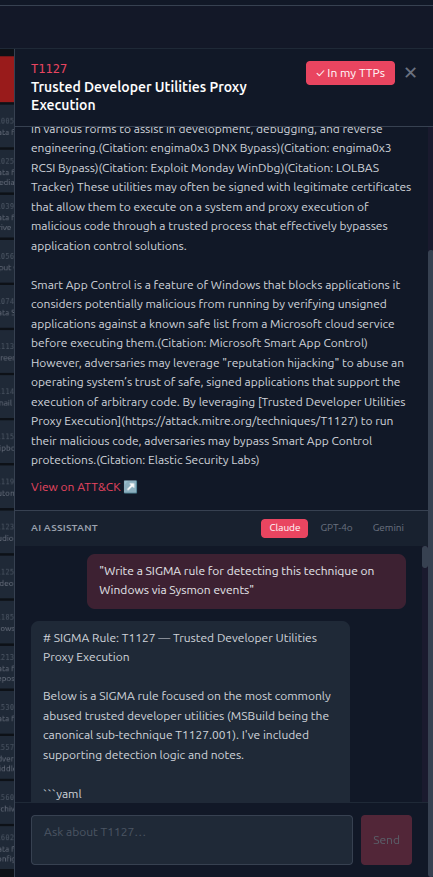
Detection engineering
"Write a SIGMA rule for detecting this technique on Windows via Sysmon events"
"Give me a KQL query for Microsoft Sentinel to hunt for this technique using process creation events"
Understanding evasion
"How do attackers modify this technique to avoid common detections?"
Hunting
"What should I look for in Windows Security event logs to hunt for this technique? Give me specific event IDs and field values."
Red team context
"Which tools in the open-source red team ecosystem implement this technique?"
Correlation
"Which techniques are commonly chained with this one in post-exploitation workflows?"
Using the Context Field
The context field at the bottom of the chat lets you paste additional information — a log snippet, a list of technique IDs from your current investigation, or notes from your IR. This gives the assistant grounding in your specific situation rather than generic ATT&CK descriptions.
The context field accepts up to 8,000 characters.
Switching Providers Mid-Chat
Each message uses the currently selected provider. You can switch between Claude, GPT-4o, and Gemini within the same chat session to compare responses or use different models for different tasks (e.g. Claude for detection rules, GPT-4o for red team context).