Generating PDF Reports
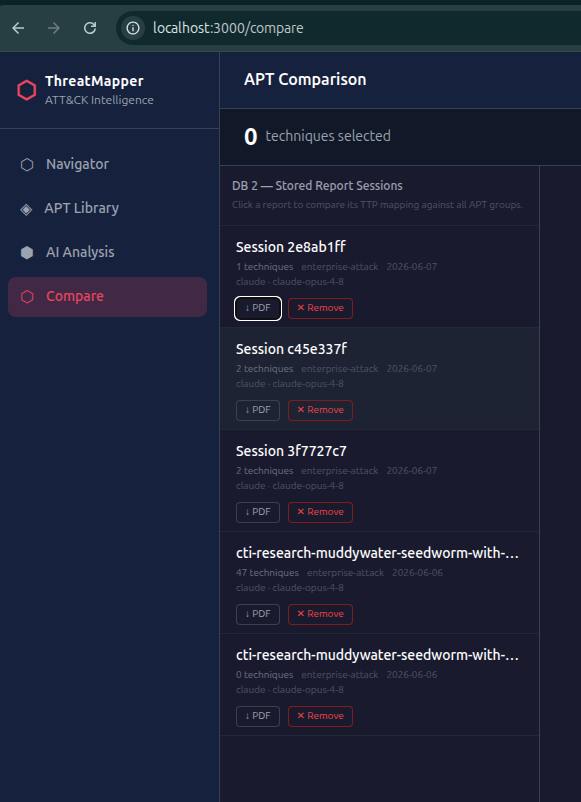
ThreatMapper generates two types of PDF reports, both produced on the backend using fpdf2 and returned as direct browser downloads.
Analysis Report
From the Analyze page, after a completed analysis, click ↓ PDF report in the results summary bar.
The report includes:
- Cover page — provider, model, domain, session ID, and timestamp
- Executive summary — the AI-generated TL;DR
- Extracted techniques table sorted by confidence descending
- APT attribution section with the top 10 Jaccard matches and shared technique lists
- Tactic coverage breakdown showing how the techniques distribute across the ATT&CK kill chain
Previous analysis sessions can be re-downloaded at any time from Compare → Reports (DB 2) using the ↓ PDF button on each session row — no need to re-run the analysis.
API
GET /api/export/analysis/{session_id}
Returns a binary PDF. Use directly as an <a href> link or download with curl:
curl "http://localhost:8000/api/export/analysis/$SESSION_ID" -o report.pdf
Navigator Layer Report
From the Navigator, click ↓ PDF in the toolbar. This button appears only when at least one technique is selected.
The layer report is lighter than the full analysis PDF. It lists all techniques in your current layer with:
- ATT&CK ID
- Technique name
- Tactics
- Platforms
Useful as a rapid deliverable for a purple-team session or a detection engineering sprint — it gives the team the technique list in a portable, shareable format without requiring a full AI analysis.
API
POST /api/export/layer
Content-Type: application/json

{
  "technique_ids": ["T1566.001", "T1059.001", "T1078"],
  "domain": "enterprise-attack"
}