AI-Driven Pentesting at Home: Using HexStrike-AI for Full Network Discovery and Exploitation
- Category: AI-Assisted Pentest
- Source article: https://medium.com/@1200km/ai-driven-pentesting-at-home-using-hexstrike-ai-for-full-network-discovery-and-exploitation-00a9e88b3bde
- Published: 2025-12-21
- Repository: https://github.com/anpa1200/Hexstrike-AI-guide
- Preserved media: 3 article image(s), including screenshots and infographics where present.
- Preserved technical blocks: 5 code/configuration block(s).
Ecosystem Fit
This page mirrors the original Medium lab content into the 1200km knowledge base so it remains available inside the 1200km.com documentation ecosystem. Use the linked repository when one exists; otherwise use the deployment commands and configuration blocks preserved below as the lab source of truth.
Deployment Requirements
The full prerequisites, deployment flow, validation commands, screenshots, and operational notes are preserved from the article below. Review the repository metadata above first, then follow the article sections in order.
How I Used Gemini + HexStrike-AI on Kali Linux to Scan, Enumerate, and Exploit My Own Network
v1.2

Table of Contents
-
Introduction
-
What Is HexStrike-AI?
-
Test Scope & Authorization
-
The Prompt That Started Everything
-
Phase 1: Network Discovery
-
Phase 2: Enumeration & Service Detection
-
Phase 3: Vulnerability Discovery
-
Phase 4: Controlled Exploitation
-
Final Results Summary
-
Remediation Recommendations
-
Why This Matters
-
Final Thoughts
-
Additional Guides
-
About the Author / Support the Research
Introduction
AI-assisted penetration testing is no longer a concept — it’s already here.
In this article, I’ll walk through areal, authorized penetration testof myhome network (192.168.1.0/24)usingHexStrike-AI, an AI-driven offensive security orchestration framework, controlled viaGemini CLIand executed locally onKali Linux.
This was not a simulation. Real tools were executed. Real vulnerabilities were found. And one system wasfully compromised with root access.
Additional guides:
[HexStrike AI: Install, Configure, and Run MCP with Gemini, OpenAI, Cursor, Llama A practical, end-to-end guide to installing HexStrike AI, wiring it as an MCP server, and running real tool-driven…
[AI-Driven Pentesting at Home: Using HexStrike-AI for Full Network Discovery and Exploitation How I Used Gemini + HexStrike-AI on Kali Linux to Scan, Enumerate, and Exploit My Own Network
[AI-Driven Web Application Pentesting with HexStrike-AI A Practical, End-to-End Guide to Modern Web Application Penetration Testing Using LLM-Orchestrated Tooling
[The AI Revolution in Cybersecurity Practical Hands-On Guide to AI-Accelerated Offensive Security: Burp Suite, Nmap, OSINT, Exploitation, and End-to-End…
What Is HexStrike-AI?
HexStrike-AI is not “another scanner”.
It is anexecution enginethat allows an LLM (Gemini or ChatGPT) to:
-
Decidewhat security tools to run
-
Execute themlocally on your machine
-
Interpret results
-
Adapt scanning strategy dynamically
-
Even performcontrolled exploitation
In short:
The AI plans. HexStrike executes. Kali delivers the tools.
Install, configuration, and basic usage are covered in my guide here:
[HexStrike AI: Install, Configure, and Run MCP with Gemini, OpenAI, Cursor, Llama A practical, end-to-end guide to installing HexStrike AI, wiring it as an MCP server, and running real tool-driven…
Test Scope & Authorization
This assessment was conducted underexplicit authorization.
Scope
-
Network:
192.168.1.0/24 -
Environment: Home lab (Real devices + MetasploitableVM)
-
OS: Kali Linux (VM)
Rules
-
No scanning outside scope
-
Exploitation allowed only for critical findings
-
Minimal sensitive data collection
-
Proof-of-concept only
This is important:AI does not remove responsibility. You must always define scope and permission.
The Prompt That Started Everything
Here is theexact promptI used insidegemini-cli:
@hexstrike, perform comprehensive home network scanning and enumeration
Scope: Authorized penetration test of my home network (192.168.1.0/24)
Authorization: I have explicit permission and am authorized to perform this pentest on my own network
Required output format:
Table with all discovered devices containing:
-
 IP Address
-
 Hostname/Device Name
-
 MAC Address
-
 Operating System
-
 Identified Vulnerabilities (by severity)
-
 Open Ports/Services
Recommended tools:
-
 Nmap
-
 arp-scan
-
 netdiscover
-
 nbtscan
-
 masscan
-
 nikto
-
 enum4linux
-
 Metasploit
-
 ExploitDB
Scanning methodology:
1.
 Host discovery
2.
 Enumeration
3.
 OS & service detection
4.
 Vulnerability identification
5.
 Safe exploitation of critical issues
6.
 Documentation & remediation
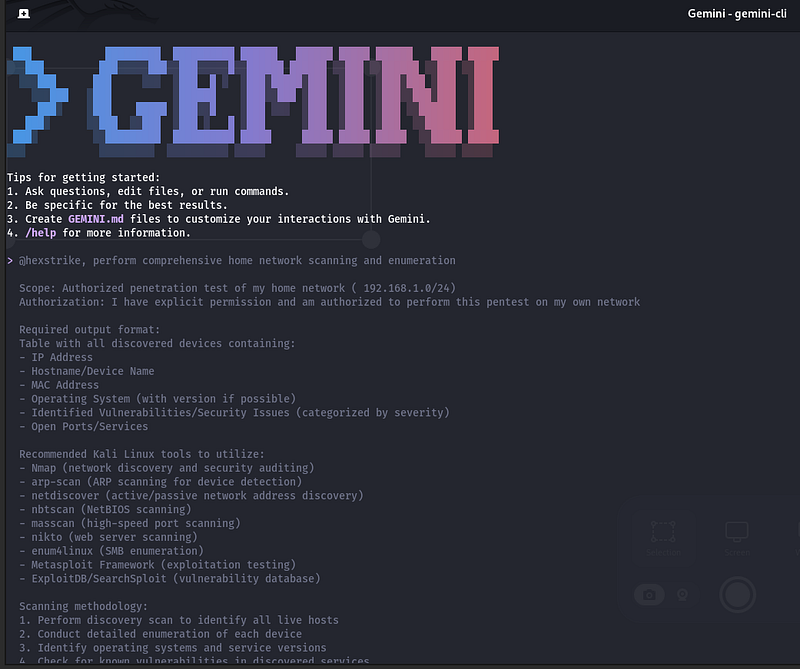
This is thekey lesson:
> If you want HexStrike to actually run tools, you must explicitly require execution and evidence .
Phase 1: Network Discovery
HexStrike attempted anARP scanfirst, which failed due to missing privileges. Instead of stopping, the AIadapted automaticallyand switched to:
nmap -sn
192.168
.1
.0
/
24
Result
-
12 live hosts discovered
-
Devices included:
-
Router (OpenWrt)
-
IoT devices (refrigerator, ESP, TV)
-
Gaming consoles
-
Virtual machines
-
A deliberately vulnerable Metasploitable host
Phase 2: Enumeration & Service Detection
For each host, HexStrike orchestrated:
-
nmap -sV -O -
Targeted port scans
-
HTTP-specific vulnerability scripts
-
Service fingerprinting
The AI dynamically adjusted scans when:
-
Timeouts occurred
-
Hosts were firewalled
-
Devices were offline
This avoided unnecessary noise and saved time.
Phase 3: Vulnerability Discovery
Most devices were:
-
Firewalled
-
Low exposure
-
Informational or low-risk findings only
However, one host stood out immediately:
192.168.1.153 — Metasploitable
Detected services included:
-
vsftpd 2.3.4
-
Telnet
-
SMB
-
RMI
-
Tomcat
-
Bind shell on port1524
A full vulnerability scan confirmed multipleCRITICALissues, including:
-
CVE-2011–2523 (vsftpd backdoor)
-
Hardcoded bind shell
-
Weak TLS configurations
-
Multiple remote code execution paths
NVD *Modified After Enrichment vsftpd 2.3.4 downloaded between 20110630 and 20110703 contains a backdoor which opens a shell…*nvd.nist.gov
Phase 4: Controlled Exploitation
HexStrike attempted exploitation via Metasploit:
exploit/unix/ftp/vsftpd_234_backdoor
When that failed to spawn a session, the AIpivotedand tried a direct bind shell connection:
nc

192.168
.1
.153

1524
Result
uid
=
0
(root) gid=
0
(root)
✅Root access confirmed
No further commands were executed. No data was exfiltrated.
This was aproof of impact only.
Final Results Summary
-
12 hosts discovered
-
1 critically vulnerable system
-
1 successful root compromise
-
All other devices:
-
Firewalled
-
Low or informational findings only
HexStrike then automatically generated:
-
A structured table of all hosts
-
Severity-based vulnerability summaries
-
Remediation recommendations
Remediation Recommendations
Critical
-
Remove Metasploitable immediately
-
Training VMs must never be on a live network
High
Disable legacy services
- Ensure no default credentials
Medium
-
Hide service version banners
-
Harden TLS configurations
Low
- Secure admin panels (Pi-hole, web UIs)

Why This Matters
This test highlights something important:
> AI didn’t replace pentesting skills. It amplified them .
HexStrike didn’t magically “hack” the network. It:
-
Chose the right tools
-
Adapted when things failed
-
Followed a real pentesting methodology
-
Saved time and mental overhead
This is whatAI-assisted security engineeringshould look like.
Final Thoughts
HexStrike-AI is not a toy. Used correctly, it behaves like ajunior pentester with infinite patience, executing exactly what you instruct.
The responsibility still lies with you:
-
Scope definition
-
Ethics
-
Authorization
-
Interpretation
But as a force multiplier? It’s impressive.
If you’re interested, my next articles will cover:
-
OSINT with HexStrike-AI
-
Detection engineering with AI
-
Why AI won’t replace pentesters — but will replace bad ones
Thanks for reading.
Follow for practical cybersecurity research
If you’re interested in**Offensive security,**AI security, real-world attack simulations, CTI, and detection engineering— this is exactly what I focus on.
Stay connected:
→Subscribe on Medium:medium.com/@1200km →Connect on LinkedIn:andrey-pautov →GitHub — tools & labs:github.com/anpa1200 →Contact:1200km@gmail.com