
User Training involves educating employees and contractors on recognizing, reporting, and preventing cyber threats that rely on human interaction, such as phishing, social engineering, and other manipulative techniques. Comprehensive training programs create a human firewall by empowering users to be an active component of the organization's cybersecurity defenses. This mitigation can be implemented through the following measures: Create Comprehensive Training Programs: - Design training modules tailored to the organization's risk profile, covering topics such as phishing, password management, and incident reporting. - Provide role-specific training for high-risk employees, such as helpdesk staff or executives. Use Simulated Exercises: - Conduct phishing simulations to measure user susceptibility and provide targeted follow-up training. - Run social engineering drills to evaluate employ…
MITRE mitigation sourceAdversaryGraph public intelligence page
This page is part of Threat Matrix, the public browser workspace for the main AdversaryGraph platform. Use it for ATT&CK pivots, actor and technique context, similarity leads, detection coverage review, and analyst-ready investigation paths.
Validation disclaimer: TTP overlap, actor similarity, generated summaries, and coverage findings are investigation leads, not attribution proof or operational validation without analyst review.
Main AdversaryGraph project Documentation Malware Analysis GitHub
User Execution
An adversary may rely upon specific actions by a user in order to gain execution. Users may be subjected to social engineering to get them to execute malicious code by, for example, opening a malicious document file or link. These user actions will typically be observed as follow-on behavior from forms of [Phishing](https://attack.mitre.org/techniques/T1566). While [User Execution](https://attack.mitre.org/techniques/T1204) frequently occurs shortly after Initial Access it may occur at other phases of an intrusion, such as when an adversary places a file in a shared directory or on a user's desktop hoping that a user will click on it. This activity may also be seen shortly after [Internal Spearphishing](https://attack.mitre.org/techniques/T1534). Adversaries may also deceive users into performing actions such as: * Enabling [Remote Access Tools](https://attack.mitre.org/techniques/T1219), allowing direct control of the system to the adversary * Running malicious JavaScript in their browser, allowing adversaries to [Steal Web Session Cookie](https://attack.mitre.org/techniques/T1539)s(Citation: Talos Roblox Scam 2023)(Citation: Krebs Discord Bookmarks 2023) * Downloading and executing malware for [User Execution](https://attack.mitre.org/techniques/T1204) * Coerceing users to copy, paste, and execute malicious code manually(Citation: Reliaquest-execution)(Citation: proofpoint-selfpwn) For example, tech support scams can be facilitated through [Phishing](https://attack.mitre.org/techniques/T1566), vishing, or various forms of user interaction. Adversaries can use a combinati…
Open detection, hunting, mitigation, and evidence workspace
Detection logic
Monitor the execution of and command-line arguments for applications that may be used by an adversary to gain Initial Access that require user interaction. This includes compression applications, such as those for zip files, that can be used to Deobfuscate/Decode Files or Information in payloads. Anti-virus can potentially detect malicious documents and files that are downloaded and executed on the user's computer. Endpoint sensing or network sensing can potentially detect malicious events once the file is opened (such as a Microsoft Word document or PDF reaching out to the internet or spawning powershell.exe).
Observed actors
Correlated CTI and IR reports
Andrey Pautov · direct source mappingAPT39 (Chafer / Remix Kitten)
Israel Threat Actors CTI · explicit report mentionCTI Research: Handala Hack Group (aka Handala Hack Team)
1200km CTI repository · explicit report mentionCTI Research: Handala Hack Group (aka Handala Hack Team)
1200km CTI repository · explicit report mentionExecutive Summary
Israel Threat Actors CTI · explicit report mentionOilRig (APT34 / Helix Kitten / Earth Simnavaz etc)
Israel Threat Actors CTI · explicit report mentionCTI Research Handala Hack Group aka Handala Hack Team
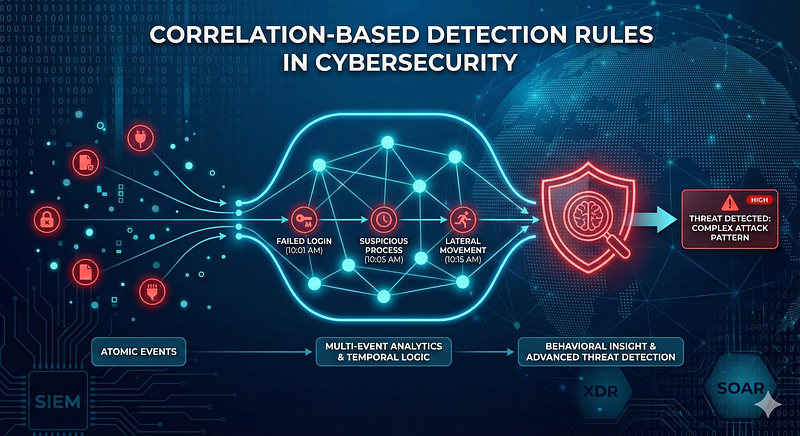
1200km Medium · authored report mentionCorrelation Based Detection Rules in Cybersecurity From Atomic Events to Behavioral Insight
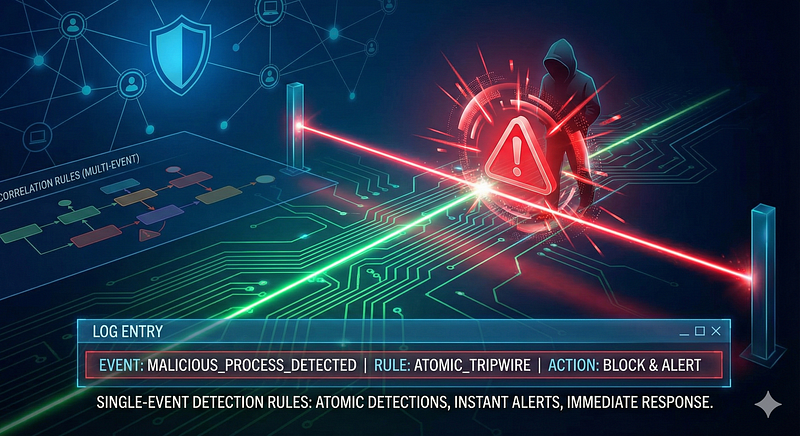
1200km Medium · authored report mentionSingle Event Detection Rules in Cybersecurity
1200km Medium · authored report mention
Cyber Knowledge context
Use these routes to move from the ATT&CK behavior into explanation, implementation, evidence handling, validation, and defensive operations. Relevance is generated from explicit identifiers/names and governed topic mappings; it is not attribution evidence.
AI Security · Governed topic match · 60/100Governance, risk, assurance, transparency, and human factors
AI Security · Governed topic match · 48/100Module 5 — Cloud, containers, and Kubernetes
Red Team & Offensive Security · Tactic learning route · 24/100Static triage: strings, imports, resources, and capabilities
Malware Analysis & Reverse Engineering · Tactic learning route · 24/100Module 4 — Detection engineering and detection as code
Blue Team & Defensive Security · Tactic learning route · 24/100
MITRE mitigations
Prevent the execution of unauthorized or malicious code on systems by implementing application control, script blocking, and other execution prevention mechanisms. This ensures that only trusted and authorized code is executed, reducing the risk of malware and unauthorized actions. This mitigation can be implemented through the following measures: Application Control: - Use Case: Use tools like AppLocker or Windows Defender Application Control (WDAC) to create whitelists of authorized applications and block unauthorized ones. On Linux, use tools like SELinux or AppArmor to define mandatory access control policies for application execution. - Implementation: Allow only digitally signed or pre-approved applications to execute on servers and endpoints. (e.g., `New-AppLockerPolicy -PolicyType Enforced -FilePath "C:\Policies\AppLocker.xml"`) Script Blocking: - Use Case: Use script control me…
MITRE mitigation sourceBehavior Prevention on Endpoint refers to the use of technologies and strategies to detect and block potentially malicious activities by analyzing the behavior of processes, files, API calls, and other endpoint events. Rather than relying solely on known signatures, this approach leverages heuristics, machine learning, and real-time monitoring to identify anomalous patterns indicative of an attack. This mitigation can be implemented through the following measures: Suspicious Process Behavior: - Implementation: Use Endpoint Detection and Response (EDR) tools to monitor and block processes exhibiting unusual behavior, such as privilege escalation attempts. - Use Case: An attacker uses a known vulnerability to spawn a privileged process from a user-level application. The endpoint tool detects the abnormal parent-child process relationship and blocks the action. Unauthorized File Access: -…
MITRE mitigation sourceRestricting web-based content involves enforcing policies and technologies that limit access to potentially malicious websites, unsafe downloads, and unauthorized browser behaviors. This can include URL filtering, download restrictions, script blocking, and extension control to protect against exploitation, phishing, and malware delivery. This mitigation can be implemented through the following measures: Deploy Web Proxy Filtering: - Use solutions to filter web traffic based on categories, reputation, and content types. - Enforce policies that block unsafe websites or file types at the gateway level. Enable DNS-Based Filtering: - Implement tools to restrict access to domains associated with malware or phishing campaigns. - Use public DNS filtering services to enhance protection. Enforce Content Security Policies (CSP): - Configure CSP headers on internal and external web applications to…
MITRE mitigation sourceUse intrusion detection signatures to block traffic at network boundaries.
MITRE mitigation sourcePrevent users or groups from installing unauthorized or unapproved software to reduce the risk of introducing malicious or vulnerable applications. This can be achieved through allowlists, software restriction policies, endpoint management tools, and least privilege access principles. This mitigation can be implemented through the following measures: Application Whitelisting - Implement Microsoft AppLocker or Windows Defender Application Control (WDAC) to create and enforce allowlists for approved software. - Whitelist applications based on file hash, path, or digital signatures. Restrict User Permissions - Remove local administrator rights for all non-IT users. - Use Role-Based Access Control (RBAC) to restrict installation permissions to privileged accounts only. Software Restriction Policies (SRP) - Use GPO to configure SRP to deny execution of binaries from directories such as `%App…
MITRE mitigation sourceMITRE detection strategies and analytics
- AN1314 · Analytic 1314 — Cause→effect chain: (1) User-facing app (Office/PDF/archiver/browser) records an open/click or abnormal event, then (2) a downloaded file is created in a user-writable path and/or decompressed, (3) the parent user app spawns a living-off-the-land binary (e.g., powershell/cmd/mshta/rundll32/msiexec/wscript/expand/zip) or installer, and (4) immediate outbound HTTP(S)/DNS/SMB from the same lineage.
- AN1315 · Analytic 1315 — Cause→effect chain: (1) User app/browser/archiver logs an open/click or abnormal exit, (2) new executable/script/archive extracted into $HOME/Downloads, /tmp, or ~/.cache, (3) parent app spawns shell/interpreter (bash/sh/python/node/curl/wget) or desktop file, and (4) new outbound connection(s) from the child lineage.
- AN1316 · Analytic 1316 — Cause→effect chain: (1) unified logs show application open/click or crash for Safari/Chrome/Office/Preview/archiver, (2) file write/extraction into ~/Downloads, /private/var/folders/* or ~/Library, (3) parent app spawns osascript/bash/zsh/curl/python or opens a quarantined app with Gatekeeper prompts, (4) network egress from child.
- AN1317 · Analytic 1317 — Cause→effect chain in CI/dev desktops: (1) user triggers container run/pull after opening a doc/link/script, (2) newly created image/container uses unexpected external registry or entrypoint, (3) container starts and immediately egresses to suspicious destinations.
- AN1318 · Analytic 1318 — Cause→effect chain in cloud consoles: (1) user clicks link then invokes instance/image creation via API, (2) instance/image originates from external AMI or unknown image, (3) instance immediately egresses or retrieves payloads.
Continue the investigation
Attack tools, simulations and detection rules
Follow explicit source relationships into the reference modules. Linked procedures and detectors are not claims of live validation or actor attribution.
- T1204 User Execution simulation — Exact active technique ID
- T1204 detection rules — Exact active technique ID; not actor-specific detector coverage