AdversaryGraph public intelligence page

This page is part of Threat Matrix, the public browser workspace for the main AdversaryGraph platform. Use it for ATT&CK pivots, actor and technique context, similarity leads, detection coverage review, and analyst-ready investigation paths.

Validation disclaimer: TTP overlap, actor similarity, generated summaries, and coverage findings are investigation leads, not attribution proof or operational validation without analyst review.

Main AdversaryGraph project Documentation Malware Analysis GitHub

T1566.001 · initial-access · 80 actors · 13 correlated reports

Spearphishing Attachment

Adversaries may send spearphishing emails with a malicious attachment in an attempt to gain access to victim systems. Spearphishing attachment is a specific variant of spearphishing. Spearphishing attachment is different from other forms of spearphishing in that it employs the use of malware attached to an email. All forms of spearphishing are electronically delivered social engineering targeted at a specific individual, company, or industry. In this scenario, adversaries attach a file to the spearphishing email and usually rely upon User Execution to gain execution. Spearphishing may also involve social engineering techniques, such as posing as a trusted source. There are many options for the attachment such as Microsoft Office documents, executables, PDFs, or archived files. Upon opening the attachment (and potentially clicking past protections), the adversary's payload exploits a vulnerability or directly executes on the user's system. The text of the spearphishing email usually tries to give a plausible reason why the file should be opened, and may explain how to bypass system protections in order to do so. The email may also contain instructions on how to decrypt an attachment, such as a zip file password, in order to evade email boundary defenses. Adversaries frequently manipulate file extensions and icons in order to make attached executables appear to be document files, or files exploiting one application appear to be a file for a different one.

Open detection, hunting, mitigation, and evidence workspace

Detection logic

Network intrusion detection systems and email gateways can be used to detect spearphishing with malicious attachments in transit. Detonation chambers may also be used to identify malicious attachments. Solutions can be signature and behavior based, but adversaries may construct attachments in a way to avoid these systems. Filtering based on DKIM+SPF or header analysis can help detect when the email sender is spoofed. Anti-virus can potentially detect malicious documents and attachments as they're scanned to be stored on the email server or on the user's computer. Endpoint sensing or network sensing can potentially detect malicious events once the attachment is opened (such as a Microsoft Word document or PDF reaching out to the internet or spawning Powershell.exe) for techniques such as Exploitation for Client Execution or usage of malicious scripts. Monitor for suspicious descendant process spawning from Microsoft Office and other productivity software.

Observed actors

Correlated CTI and IR reports

Cyber Knowledge context

Use these routes to move from the ATT&CK behavior into explanation, implementation, evidence handling, validation, and defensive operations. Relevance is generated from explicit identifiers/names and governed topic mappings; it is not attribution evidence.

MITRE mitigations

M1049 · Antivirus/Antimalware

Antivirus/Antimalware solutions utilize signatures, heuristics, and behavioral analysis to detect, block, and remediate malicious software, including viruses, trojans, ransomware, and spyware. These solutions continuously monitor endpoints and systems for known malicious patterns and suspicious behaviors that indicate compromise. Antivirus/Antimalware software should be deployed across all devices, with automated updates to ensure protection against the latest threats. This mitigation can be implemented through the following measures: Signature-Based Detection: - Implementation: Use predefined signatures to identify known malware based on unique patterns such as file hashes, byte sequences, or command-line arguments. This method is effective against known threats. - Use Case: When malware like "Emotet" is detected, its signature (such as a specific file hash) matches a known database of…

MITRE mitigation source
M1018 · User Account Management

User Account Management involves implementing and enforcing policies for the lifecycle of user accounts, including creation, modification, and deactivation. Proper account management reduces the attack surface by limiting unauthorized access, managing account privileges, and ensuring accounts are used according to organizational policies. This mitigation can be implemented through the following measures: Enforcing the Principle of Least Privilege - Implementation: Assign users only the minimum permissions required to perform their job functions. Regularly audit accounts to ensure no excess permissions are granted. - Use Case: Reduces the risk of privilege escalation by ensuring accounts cannot perform unauthorized actions. Implementing Strong Password Policies - Implementation: Enforce password complexity requirements (e.g., length, character types). Require password expiration every 90…

MITRE mitigation source
M1047 · Audit

Auditing is the process of recording activity and systematically reviewing and analyzing the activity and system configurations. The primary purpose of auditing is to detect anomalies and identify potential threats or weaknesses in the environment. Proper auditing configurations can also help to meet compliance requirements. The process of auditing encompasses regular analysis of user behaviors and system logs in support of proactive security measures. Auditing is applicable to all systems used within an organization, from the front door of a building to accessing a file on a fileserver. It is considered more critical for regulated industries such as, healthcare, finance and government where compliance requirements demand stringent tracking of user and system activates.This mitigation can be implemented through the following measures: System Audit: - Use Case: Regularly assess system co…

MITRE mitigation source
M1031 · Network Intrusion Prevention

Use intrusion detection signatures to block traffic at network boundaries.

MITRE mitigation source
M1054 · Software Configuration

Software configuration refers to making security-focused adjustments to the settings of applications, middleware, databases, or other software to mitigate potential threats. These changes help reduce the attack surface, enforce best practices, and protect sensitive data. This mitigation can be implemented through the following measures: Conduct a Security Review of Application Settings: - Review the software documentation to identify recommended security configurations. - Compare default settings against organizational policies and compliance requirements. Implement Access Controls and Permissions: - Restrict access to sensitive features or data within the software. - Enforce least privilege principles for all roles and accounts interacting with the software. Enable Logging and Monitoring: - Configure detailed logging for key application events such as authentication failures, configura…

MITRE mitigation source
M1017 · User Training

User Training involves educating employees and contractors on recognizing, reporting, and preventing cyber threats that rely on human interaction, such as phishing, social engineering, and other manipulative techniques. Comprehensive training programs create a human firewall by empowering users to be an active component of the organization's cybersecurity defenses. This mitigation can be implemented through the following measures: Create Comprehensive Training Programs: - Design training modules tailored to the organization's risk profile, covering topics such as phishing, password management, and incident reporting. - Provide role-specific training for high-risk employees, such as helpdesk staff or executives. Use Simulated Exercises: - Conduct phishing simulations to measure user susceptibility and provide targeted follow-up training. - Run social engineering drills to evaluate employ…

MITRE mitigation source
M1021 · Restrict Web-Based Content

Restricting web-based content involves enforcing policies and technologies that limit access to potentially malicious websites, unsafe downloads, and unauthorized browser behaviors. This can include URL filtering, download restrictions, script blocking, and extension control to protect against exploitation, phishing, and malware delivery. This mitigation can be implemented through the following measures: Deploy Web Proxy Filtering: - Use solutions to filter web traffic based on categories, reputation, and content types. - Enforce policies that block unsafe websites or file types at the gateway level. Enable DNS-Based Filtering: - Implement tools to restrict access to domains associated with malware or phishing campaigns. - Use public DNS filtering services to enhance protection. Enforce Content Security Policies (CSP): - Configure CSP headers on internal and external web applications to…

MITRE mitigation source

MITRE detection strategies and analytics

DET0236 · Detection Strategy for Spearphishing Attachment across OS Platforms
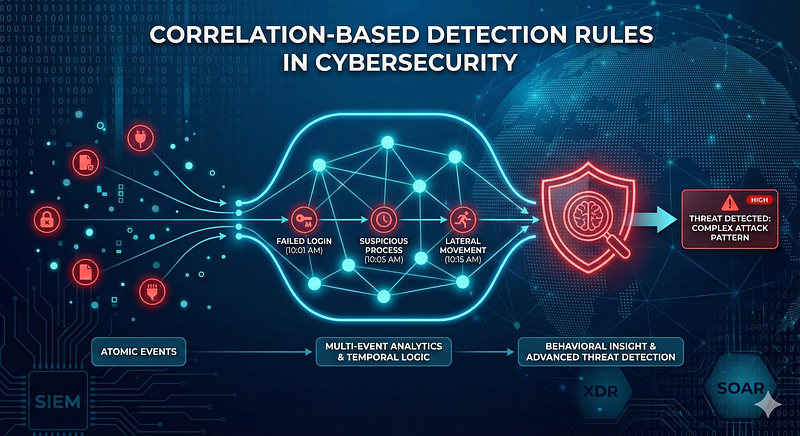
  • AN0655 · Analytic 0655 — Detection of spearphishing attachments by correlating suspicious email delivery with subsequent file creation and abnormal process execution (e.g., Office spawning PowerShell or CMD). Behavior chain includes inbound email metadata → attachment stored on disk → process execution → outbound network activity.
  • AN0656 · Analytic 0656 — Phishing attachments executed on Linux systems are detected by linking email logs to file creation in mail directories and subsequent suspicious process execution. Look for unexpected binaries or scripts spawned from user mail directories and anomalous outbound network activity.
  • AN0657 · Analytic 0657 — Phishing attachment detection on macOS through correlation of Mail app logs, file creation in user directories, and abnormal process execution (e.g., Preview.app or Mail.app spawning Terminal or scripting binaries). Network traffic after attachment interaction is also monitored.
MITRE detection source

Continue the investigation